Showing posts with label Art. Show all posts

Saturday, 19 April 2014

Anxiety Awareness Week 2014

Brief:
Since Anxiety is something that effects almost every aspect of my life, I decided that since Anxiety awareness week was coming up soon, I would do something to recognise this, as well as try to possibly educate, through a visual means, what life is like when suffering from this. I knew this would be an iffy subject to go over, as I never like fully discussing what happens when I experience anxiety, but obviously drawing an illustration is heaps better than sitting down and trying to explain to someone what it’s like.

Evaluation:
 I knew straight away that I wanted this to be a pure black and white, pure and simple, without anything to distract the viewer from the main parts of this image. I also chose to complete this illustration in pencil, as I think keeping things simple and pure it the best way to get a message across. I started off with a really basic sketch, and wasn’t sure if I was going to actually out any features on the face of my character, simply because there isn’t a defining face for who anxiety and depression can happen to. But I did end up choosing to put a face, which I suppose looks a little bit like my own (but not intentionally) just to make it a little more personal. I wasn’t quite sure on how to depict anxiety as an actual subject for about three days, as trying to describe it to someone is difficult enough, but the defining word that stood out whenever I’ve tried to describe it is “gripping” and “something that can just cling to you for hours,” and this gave me the idea for a talon, as its scary, sharp and strong enough to project the power that anxiety can have over someone.
There are plenty strengths and weaknesses in this piece for me to pick out. A strength that is most obvious to me is my line work, and I really enjoy using line density to add character and an overall theme to my work. I have a pretty steady hand and am able to create the long flowing streaks in her hair and eyelashes, but am also able to make the bold and angled lines on the talons gripping her hair. Although one of my weaknesses is my trademark “female face” that I use in literally all of my work, and I WOULD like to sometime soon just concentrate on drawing males more, and depict different looking people rather than my “default face.”

I think the skills I have shown in this piece are skills I would really like to take on with me through to later work, and I think I could achieve this by going back to doing more traditional sketch work before putting my work on digitally, as now I tend to just do my work straight away in a digital format. I think this was inspired slightly through researching Dave Correia's work online, as I found that his way of showing so much detail an using a traditional workflow at that. 

Thursday, 17 April 2014

The Young Illustrator's Award 2014/ Evaluation.


This year, I have chosen to take part in the Young Illustrator’s Award 2014. I feel as though this is an apt competition for me or anyone to take part in because of its limitless choices in what someone who is participating can do.
My entry for the competition is something I thought about a lot, and failed to come to any conclusion. So I went and dug down to the literal meaning of the word “Inspiration,” and decided to look at a number of artists who first sparked my interest in Art, and this is where I rekindled my love for Alphonse Mucha.
This year, I have chosen to take part in the Young Illustrator’s Award 2014. I feel as though this is an apt competition for me or anyone to take part in because of its limitless choices in what someone who is participating can do. It is a self-directed competition, where the Artist chooses their own theme and subject, which they can then present in the hopes of winning. 
My entry for the competition is something I thought about a lot, and failed to come to any conclusion. So I went and dug down to the literal meaning of the word “Inspiration,” and decided to look at a number of artists who first sparked my interest in Art, and this is where I rekindled my love for Alphonse Mucha.


Evaluation.
Over all, I thoroughly enjoyed this project. I knew from the word “Go,” that it was something fresh and void of all other projects we had been asked to do so far, and was something completely of my own choice which was just an added bonus. I also knew that, because it was such a wide spread subject, and that I could do pretty much anything I wanted, I would almost definitely have trouble trying to think of what to do. This is why I went back to one of the first things that inspired me to start going into ILLUSTRATION and not just painting. On the other hand, choosing to do something based on the style of Alphonse Mucha was also a dangerous one, because he has been such an inspiration to so many people, I knew I would have to make my work stand out against the hundreds of other pieces of work based on his style. I began clearly unsure, for about a week, on what I wanted my piece to be on, but I ended up going with what I knew best, and stuck to my strengths when it came to illustrating. I was a lot more confident with what I actually wanted to produce, and because of my recent development in skills over the year, I could see much clearly, what I wanted my final outcome to be, rather than had I tried this out before christmas.
I used all of the knowledge I have gained over the past two years, not only with regards to illustrating, where I have been shown in detail some top tricks, shortcuts, workflows and skills in programs such as photoshop, where those tricks can be applied to other programs I use as well, but with basic skills. An example of this woul be on colour schemes and learning to literally paint in a digital format. I feel as though these aspects are clearly shown in my competition entry, and are able to give off a defining mood and theme to my image, without me having to explain anything about it.
One problem I had during the production of this piece was a general flop in my motivation towards it. I sat for a good 3 hours re-doing the same pieces over and over again simply because I was unhappy with how they looked, and it almost got to the point where wanted to change the idea completely. However, with some inspiration (watching speed painting tutorials on Youtube…) I was able to gain back that motivation and change the colour scheme of the figure’s face slightly, where it was easier for me to begin colouring her skin. There was also an ongoing war for about 3 days with regards to shading on the figure’s face, as I had never really painted a face from that angle before. And I over came this by taking photos of my own face, with specific lighting set up to immitate the scene I wanted going on.
To conclude, I have thoroughly enjoyed this project, as it has tested me on more than a physical scale and left me knowing even more about digital painting and illustration, as well as me appreciating the work and effort behind Alphonse Mucha’s wonderful pieces of art. 

Thursday, 3 April 2014

Re-creating my Storyboards.


I decided that, because I didn't get a chance to finish off my animation, I would take it upon myself to re-create the storyboards I had created to a better quality and making them look more professional. I have recreated the set up from scene 2- my animation, and have used screen shots from my actual first scene of my animation as well. 


Evaluation.
I found from recreating these pieces, that I gained a bit more knowledge into how colour schemes can look really effective, especially in an animation like this. The fact I have taken proper time to recreate certain pieces, such as the set from scene 2, and the characters themselves, makes the whole thing look so much more clean and tidy, and I'm really pleased to have it as a piece to represent my work. I am particularly pleased with an idea I had in order to make it look as though there were a 
corridor of trees in the 3rd storyboard, by simply free-deforming the image of the second scene and painting over it.

On the whole I really am pleased with this piece, it gives a much better idea as to what I wanted from my animation and speaks to a much higher and professional looking quality! 


Thursday, 27 February 2014

Amy Sol; Wreath, (2012.)


Another piece of work created by Amy Sol, which caught my eye instantly, was her 2012 piece entitled “Wreath.” I feel this piece relates to, or could be slightly based off children’s’ stories, when looking at all the delicately produced animals and their simple and content expressions, as when most animals are produced or included in artwork, they are passed off as aggressive and mighty beasts.
The style of this piece is very subtle and gentle, which is helped by a very subtle background, the layout and placement of each individual pieces on this image work in favour of a soft and gentle nature as well, mainly because of the idea of a circle having no sharp edges. Also, the circle would metaphorically insinuate that everything would live together and connect through some sort of mutual kindness.
The techniques used in this piece are very simple. Is it a sketched out piece, later filled in with great detail, all in pencils of different thickness's and densities. I feel as though this aspect would inspire me and help my skills vastly, mainly because of the previously mentioned problem I have with my colouring ability. And I feel that using only pencil or even pen would work very well until I was at a stage where I felt comfortable showing off my perfected technique of colouring.

Another aspect of this image that would benefit my skills in the long run would be presentation. I feel as though my work is very predictable when it comes to layout, and sometimes having constant dynamic poses doesn’t always fit best with my work, and I feel that using this kind of layout would let me get so much more into my pieces of artwork, and bind them all together in a very effective way. As opposed to having random characters just lying around the page and not looking as though they are truly interacting with each other. 

Friday, 21 February 2014

Project 4: Week 4 - Creating abstract shapes in Cinema 4D/ Evaluations.

Here, I have attempted to make an abstract shape in Cinema 4D, this process will be worked into my
footage when creating my idents. As one of the aspects of our task is to create 3D, abstract shapes which can be put into the footage, much like Kandinsky’s artwork, where the emotions given off in films can be put onto screen as shapes, colours and movements.
To begin my task of creating a simple abstract shape, I opened up Cinema 4D and went to the “Spline” tool and used it’s freehand option to draw a random squiggle on the composition, and then blew up the thickness of the shape to make it more 3D and to give it more body.  
Once I had completed this aspect, I went on to add some effectors to the shape, and one of the effects I added to the spline was “Random,” which made the image split out and spread more. And another effect that I decided to add onto the shape was the “Formula,” effect, this effect made the shape have a much softer edge. This effect also changed the way that the shape moved, when I pressed play on the timeline. I think this was a really effective thing to try out, as it made a rather still and stark shape seem much more like an organism and gave it a much more professional look rather than a generic computer-generated image.

I then went on to add some more effectors to my shape. I wanted my shape to resemble some sort of swirl, so I added the effector named “Twist,” which resembled a circular tool on the screen, and when I changed the scale, position and rotation of this circle, it would alter the vastness of the change towards the shape. It also made the shape twist, obviously, and turn into a sort of vortex which looked really effective. Although once I had done this, I realised that the shape was too close together, so to alter this I put in another effector what was named “Explosion,” so you can only guess what that did to the shape. The rules of “Explosion,” were exactly the same as the rules in “Twist,” where if a changed any value of the circle that would affect the shapes dynamics. This made the shape look much more alive and full of character.


I then went on to add music to this shape, as I wanted to see it react and move with beats of music, so I went to “MOGRAPH>EFFECTOR>SOUND,” this brought up a box where I added a music file. I then pressed play on my timeline, and it showed the shape changing and morphing to the different beats that the music was giving off which I thought looked really cool. But I then decided that I didn’t want to just have the whole shape moving at the same time. So I went to “Strength,” down the bottom of the box and clicked on “All,” here I changed it to “Step,” so that different pieces of the shape would move at different beats to the music, which looked so much better.
 
This is what my result was of this test, and over all I am happy with the outcome. The shape expands and contracts with different parts of it’s body, in time to music and I think this looks really effective, and resembles a beating heart somewhat. The “shattered” effect that this shape displays looks really edgy, and the twisted look to it also makes it look as though it’s some sort of sharp tornado.

I then went on to try and make shapes out of ready-made and 3D objects on cinema 4D, and one of these tests I did started off where I uploaded a 3D shape of the DCM logo onto a new file.
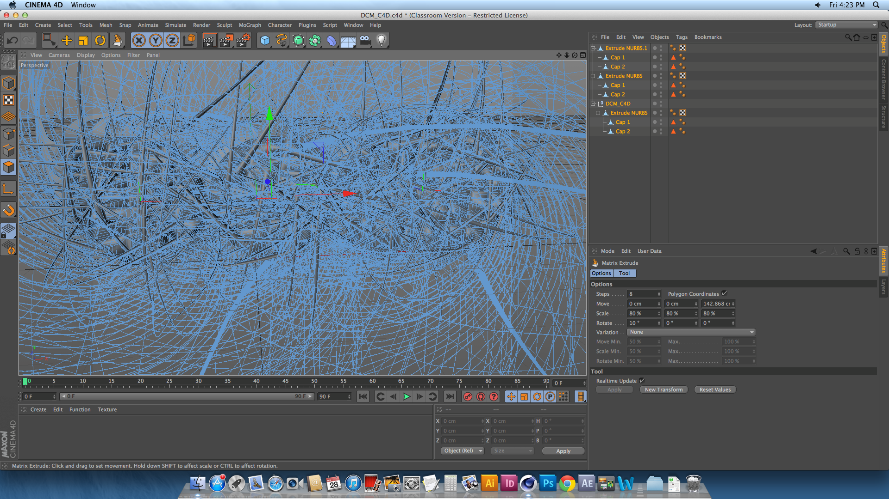
I then made sure the image was editable, and used the knife tool to create cuts across the body of the logo. These cuts would split the shape up fully into separate pieces, whilst keeping the actual shape together, so that it can be altered in many different ways depending on what the user wants. After this made sure that the editable tag was clicked off, and selected the whole piece. I did this by selecting all of the layers on the list to the right of the screen, not on the physical shape itself, to make sure that I was able to select all of the individual pieces of the logo. After I had done this, I then went on to change the shape of the logo drastically, and to do this I went to MESH>CREATE TOOLS> MATRIX EXTRUDE.
This process is usually used to create weird and wonderful shapes like the hair on someone’s head of a 3D model, as well as limbs and pretty much an

y counterpart someone can think of. In this case, I used
the Matrix Extrude to dynamically change the over-all image of this logo, and that is simply done by pulling the tool out and away from the shape. Once the tool is pulled away, every single part of the logo that had been cut up was the extruded and morphed into a heaping mass of spikes and shards, which looked amazing even when it hasn’t been rendered. However, once I did render the image, I was shocked as to how well it all came out. I was able to zoom out of the logo to make more sense of the state of
it.


This is what the final rendered image looks
like. Over all I’m really surprised at how easy it is to make something so simple look so effective. I love the way that each and every individual spike can be seen, and the mass of spiked curves make the image look very mechanic. Because of this, I decided that although  I could make the image look so abstract and messed up by putting in any number of colours, textures and effectors in, I decided to keep the image grey, as I really was taken to the mechanic element that I got from it. 

Friday, 7 February 2014

Project 4: Week 2 - Testing out Compositing on a Photograph.


he first thing I did, was set up cinema 4D, where I created a new material. I added a pre-taken photograph to the “Colour” section of the material and made sure that “Specular” was unchecked, as I didn’t was a shine to appear on a rather organic looking image. I then created a “background” piece, where I clicked and dragged the material onto its layer on the right hand side of the screen. At this point, I went on to add a camera to the composition. I adjusted the view of the camera using the small icons on the top of the screen which control the angles and viewpoints on the screen. The advice I was given when using this tool was “If it looks right, then it will be,” which gave me a bit more confidence when ensuring that this tool was in the right position. I then went onto the timeline along the bottom of the screen and added a key-frame to it using the red button with the key symbol. This was to ensure that I could move the angles around in order to edit small bits and pieces, and then still be able to go back to the original and correct viewing later on.
I then added a simple “Plane” to my composition, this would be the basis for what the abstract object would sit/cover/float over. I then went to “Panel>All Views,” to see my setup from different angles to find and manoeuvre the plane into view and in the correct location. Once my Plane was in place, I clicked on the “Projection,” which is hidden under the list in the image, and clicked on UV mapping, which make the image un-distort and become the same image that was below it. I then went just above the list and licked on “TAGS>CINEMA 4D TAGS>COMPISITING.” This brought up a selection of options, of which I made sure that “Compositing Background” and “Receive Shadows,” were active and “Cast Shadows,” wasn’t, this means that the plane wouldn’t cast any shadows onto the background, but would receive shadows off something else.
After I had completed my layout for the scene, I went onto add in a simple 3D cube and turned it onto an angle to it looked less static. I went onto “All Views,” again in order to place the cube in the correct place on my composition, and the resized/shaped it as I saw fit.
I then added a light to my composition, this was artificial light that would a substitute sun in my image. I chose to place the light to the right and slightly in front of the object, but out of sight of the camera. The
distance and size of the light, compared to the cube, would ultimately determine the shape, size and contrast of the shadow. However, I went on to edit the shadow more by clicking on the “Light,” layer an further down the page, I found the “Shadow,” option, which enabled me to choose different formats of shadow to choose from, I chose “SHADOW>SOFT,” then adjusted the density of the shadow using the scale option, which goes both under and over 100%. I also used the “Shadow Mapping,” tool to either soften or sharpen the edge of the shadow, and the higher the number, the harder the shadow would be. I adjusted all of these settings until I felt happy and was confident that the shadow looked realistic enough. As there weren’t many other shadows on the photograph to begin with, it look a little bit of time, fiddling around with these options in order to create a natural looking shadow.

Because the shadow was being cast onto a flat surface, I would have to change the shape and surface of the Plane so that the shadow looks as though it has been cast more evenly. This will also make it look as though the object I have put into my composition is an actual part of my photograph. To do this, I made sure the “Plane,” level was highlighted, and then I went onto the top right of the screen where it says “Layout,” and clicked on “Sculpting,” from the drop-down menu.

This brought up a list of things I could use to sculpt this composition, I subdivided the layer by 4, and then used the “Pull,” tool which would normally pull up bits of the layer. However, I learned that when holding CTRL, the “Pull,” tool actually pushes the layer down, to create bumps and crevices in the image. I used this tool and followed the edge of the tree trunk, along with small cracks and divides in the image, to make the shadow follow the shape of the photograph, which in turn, added a more realistic feel to the fact of the 3D object in the photo. It also made the image look much more professional, as having a completely flat shadow on such an obviously rigid object would look ridiculous. 

Wednesday, 5 February 2014

Amy Sol; Moth’s Poem, (2012.)


Amy Sol’s 2012 piece, entitled “Moth’s Poem,” was a piece that, I think, could be one of the most influential pieces I’ve seen this year. It answers so many questions and query’s that I have had about traditional work and applying the style to when working on a digital format  and being able to make sophisticated background, as that part of digital and traditional art is where I seem to have most problems.
I don’t feel there’s much of a background story to this image, and it seems to be more of a piece dedicated to just being something peaceful and serene whilst being looked at, which is another aspect that I would love to apply to my own artwork.
The image does not contain any thick black lines or sharp marks to indicate any change in character or texture, but considering how well these colours all seem to fit together, I love how they are also so contrasting from each other, so that different layers, aspects and characters are defined from each other so well.
Technically, this piece clearly shows the amount of time and effort put into it, not just during the production of this piece but what she has applied to the piece once it has been done. For example she shows that after she had completed the hair of her main character, having painted it in oil paint meaning it would remain wet for a long while, she was able to blend a much lighter colour into it in order to give that shine and haze, which looks so realistic and as though sunlight is poking through the many vines that surround her.

I feel as though this piece’s main influence on me would be backgrounds. I have the most trouble when it comes to artwork, with backgrounds as I never feel confident enough to go create/ produce an outlined piece of work with a background in it. However using this image has made me realize that simplicity could well be the key to me starting off my background artwork, which in turn has given me a lot more confidence!
Another aspect of this image that I would take away and apply to my own work would be colour schemes. I always feel as though my work looks a lot better when it’s simply lined out, instead of having colour on them, and for some reason never am able to find the colours that fit together, however I’ve found that pencil and paints go in an order of shades of colours, may well help my skills when it comes to colouring my work.

Friday, 31 January 2014

Project 3: Research into Mixed Media Idents- MTV Poland


This ident was made to be broadcasted on MTV Poland. And it consists of a number of slow panning shots around a site in the country-side. It starts off with a CGI’d piece of plastic/fabric twisting and turning over the edge of a lake. It continues to transform until it turns into a set of speakers, obiously to relate back to the MTC company. As it is doing this, the water makes a small ripple, which escalates into a smal tidal wave.
There are a number of techniques thatused in this animation. One of those techniques is the effect of the water, and making it move and contort. The most popular way to do this would be to create a plane on cinema 4D or something similar, and editing that plane, being able to pull and twist the plane which can make a ripple/movement effect on the water. The way that the stereo would be created would be to make the stereo first, and the go to morph and change the look of it by adding effectors such as the twister tool, and then reversing the footage in order to make the morph turn back into the stereo.

This ident caught my attention imediately, for a different reason than a normal MTV advert would. The fact that this ident is rather tranquil and has a set colour scene rather than as many as one could possibly try and get, just makes the video stand out more against all the other idents, making it a very clever choice. There isnt too much to focus on in this ident, which can work very well in  its favour, as the animators can focus more attention on the remaining pieces of animation. Because of this, the animated counterparts are so crisp, clear and realistic and eye catching.  have been 

Project 4: Research into Mixed Media Idents - Sang Yup Kim

MTV – Sang Yup Kim


This ident, I thought was probably one of the more time consuming idents that I’d seen. I starts as what
 appears to be in the inside of a body, with organs and skin and cells all pulsing and moving around. The camera then zooms out of the inside of the body to show the audience what was on the outside. It shows this small, shiny and rather angry looking creature who resembles a heart. The heart promptly explodes after the camera has steadied for about half a second, to reveal the MVT logo inside of it.

I can tell straight away from this ident that it is in full 3D animation, and has had a lot of attention put purely on how this creature looks. The heart will have been sculpted probably from a simple sphere and can be torn apart easily from making the object editable. The background is also very simple, if it has been shot in live footage then I will just be a white screen backdrop used usually for photography. However, this kind of space can be created digitally too by making a plane and curving and shaping it until it resembled a ski slope like shape. Putting simple spot lights in front of the creature will also cast great shadows on the background and make it looks quite realistic.

I think this ident is great to attract attention from audiences of all ages. It’s got that half cute/half gross factor about it which is always appealing to users specifically on the internet. I love the detail and shine effect that the heart has and it also drops a big bomb on the audience when the little monster blows up. It’s also got a lot of humour placed in this ident as well as a little shock, as when the monster bursts, his teeth and eyes just fall onto the floor leaving the skin to blow away, which I think will engage the audience well. 

Thursday, 30 January 2014

Project 3: Research into Mixed Media Idents - Digital Cinema Media

To begin my project I went to look at a number of previous versions, created by and for the company. There were a number of still images that were used in the 2013 ident which really caught my eye, a few of them being very abstract. The overall feeling that I got from this advert wasn’t necessarily a range of emotions, but one rather fierce emotion. Throughout the entire advert I got the feeling of awe, excitement, serenity and pride, which, as a marketing technique, appeared to be very effective! In all of the mini-scenes, the two elements of the scenes are very contrasting, both in colour and content. This adds such a dynamic feel to the ident, like literally send shivers up the spine and goose bumps up my arms. This shows that the content has been very carefully chosen;

Although the mini-scenes only last maybe 2 – 3 seconds each, the viewers get a good glimpse of what’s going on. In this scene, the background is a time lapsed view of a mountain range, complete with cloud coverage. The clouds have a flowing and blustery motion which sets the direction and speed of the scene. The scene within the logo has therefore got something to be timed to, the choice of footage was smart because it contrasts visually with the other footage, both in colour and content. The footage of the grass blowing in wind matches the background footage, and it is generally at the same speed that the clouds are moving as well. The overall tone of the scene is quite peaceful looking, but also has a rather majestic feel to it from the scene of the mountains, the blustery wind, and the paling shot of the grass.

Another scene in the ident which caught my eye was this one. My eyes were immediately drawn to the burst of lava, contrasting against the stark background of the globe which, in turn, morphed into what looked like a control centre on a spaceship. Environmentally, the two pieces are linked through the topic of science and exploration, but also give off the emotions of panic, excitement, power and awe, which relates well to the previous scene. The colours in this scene are really my favourite part of it. With the pale background from the earth, and the dark sky in space, which goes so well to push and emphasise the lava bursting out from the logo. There isn’t as much cohesion with the technicality of the camera, as the globe is turning one way, at a pretty consistent speed, and the lava erupts into the other direction, which throws off the attention of the audience. I think this technique works well though, as it fully puts the attention on the lava.

This frame is my all-time favourite of the whole ident. The scene is probably the least contrasting of all, but still has so much effect on the audience, and is definitely what puts the audience at peace, possibly relating to the “Happy Ending,” of a film. The scene shows the tranquil and serene footage in both the background and the logo, linking them perfectly to the emotion being emitted. The background shows the movement of jellyfish, which slowly bob and flow across the screen, which are so contrasting against the pure black backdrop given that it is very deep in the ocean. I think this works amazingly and the footage is so crystal clear it doesn’t even look real. Inside the logo is footage of the sky being shot out of what I can only assume to be an aeroplane? The sky, like the jellyfish, look so serene and easy going that it definitely brings a sense of calm to the ident. I think there is obviously a lot of technical dedication has gone into this, as underwater and 30,000 foot shots would not be hard to come by. 

Sunday, 26 January 2014

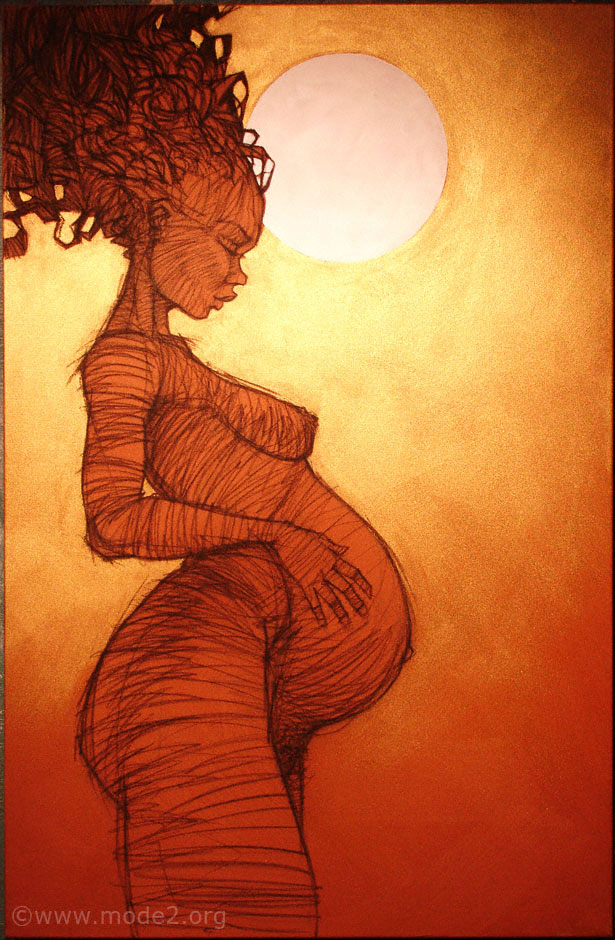
Mode2; Black Gold of the Sun, (2008.)


Another piece of Mode2’s work that I find inspiring is “Black Gold of the Sun,” done in 2008 which started off as a primary sketch turned painting.
The concept for this piece, I believe, is something that started out as a simple sketch. The image contains the picture of a pregnant woman, from the facial features and shading of the image, it looks as though she is black. The figure is also pregnant, in front of what appears to be a large sun before it sets.
The style of this image is what attracted me to it the most. The main figure in the image is made up of very sketchy and untidy lines. However, as untidy as these lines look, they have been strategically done in order to show shadow, tone and highlights on the females body, which I find very, very effective. The background of this image is also delicately painted
I believe this would inspire and encourage me, when I’m doing pencil sketches, as usually I blend and smudge the lines I draw to make very soft images, and this would be a wonderful change. I feel the style of this piece is illustrative, which automatically is in my good books, as well as it being a single colour scheme, which simplifies the image and gives it an extremely warm feeling, very tribal or even African.

The techniques used in this piece are simple, yet very effective. I believe that the background is made from oil paint and pastel on a canvas, used to create such a warm and glowing feel, usually that associated with motherhood. The drawing on the canvas looks to me as though it was done in either sharpened pastels or coloured pencil, giving off the earthly and wooden feel to the image, which again is associated with tribal influences. This image would definitely influence me in a way the others haven’t because of how this image was done. It started off as an unfinished sketch, which then was went back to after a while and rendered back as a painting. This would definitely influence me to keep any unwanted pieces of work and make them into something actually successful. 

Tuesday, 21 January 2014

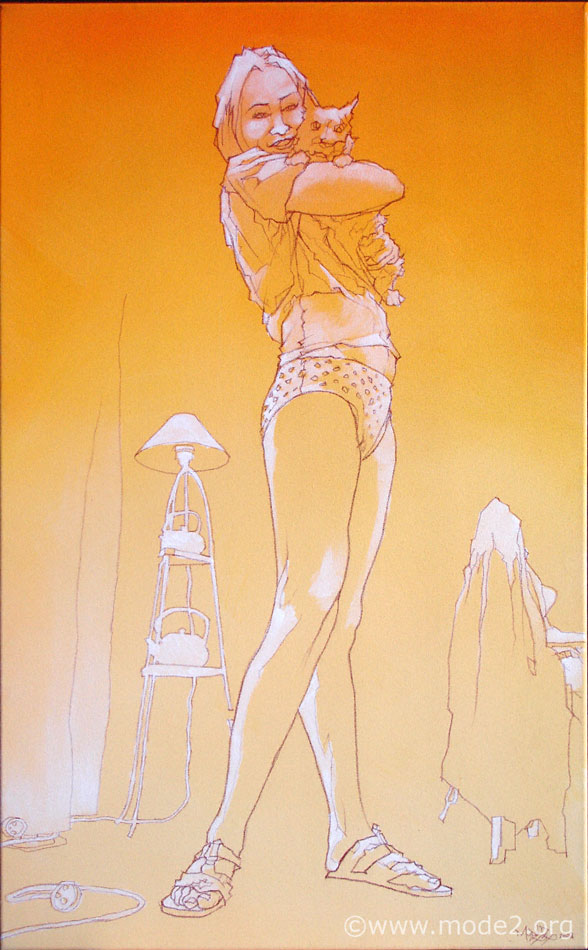
Mode2; Hold Her Tight, (2008.)

Mode2’s 2008 piece, entitled “Hold Her Tight,” is an illustration that I feel would inspire my future work I create for a number of reasons.
The concept behind a number of Mode2’s pieces of work is simple but effective illustrations that portray human figures in different and uncommon positions.
The style of this piece in particular, is rather simplistic, but has an awesome effect on the image. The image is made up of simple lines that don’t appear to have any sketchiness to them, and seem rather continuous, however they do have different thicknesses, giving delicacy and solidarity to the outline of the image.
I feel as though this style is very much something I would like to, and would find easy to replicate. The illustrative style and minimalist colour would be something I could try out on a number on my future works.

The techniques used in this piece are very simple and obvious, the background and lines are made with simple acrylic paints, used to blend and create a colour “scheme,” very successfully, so successfully in fact that it almost looks like it has been done digitally.
I love the way that Mode2 highlights the muscles and tones of the body with pastels and chalk, as it makes them seem more realistic and detailed. And considering highlighting and shading is something I would always like to improve on, it is definitely something I’m now inspired to try out.

I also find that making background objects, like the kettle and the table, into one by not separating them with lines, as it makes them seem less important, and not stick out as much. This works well in an image were everything is very simple and not a lot of detail is needed.

Friday, 17 January 2014

Project 3: Final Animations/ Evaluation.


Here, are my two final and finished scenes from my animation. 
The aim of this project was to showcase my skills in a digital format, showing how well I could manage, produce, and eventually display my work in the from of an animation. 
I began this project a little unsure of what I wanted to produce from it, I knew I wanted something rather cute and different, but I wanted it to stick in people's minds, and this is why I added such a bizarre ending. I started off with the intention of creating everything in Cinema 4D, but soon after discovering After Effects I think I knew which one I preferred. I really enjoyed making assets and in particularly, the little walk cycles and loops of my characters, as I really saw them come to life and it gave them a lot more personality, which is what I wanted to show in my animation. 
I did encounter a few problems whilst animating my work, and one of those was finding my way round Cinema 4D: Although I have a basic knowledge of the program, and enjoy using it, I found it extremely difficult and problematic to speed up my workflow and get my way around the system without constantly needing to ask for help. 
I think if I were to do anything differently, I would have done all of my animation scenes on After Effects, as I feel I got on much better on that program and would have got slightly more work done. But I have really enjoyed this project and would like to finish off this animation later on in the year. 


Project 3: Week 8 - Finalising my Animations.

Finalising my Animations.


 This week both at home and at college I was finishing up with my third scene from my animation. Now that I knew what to expect from After Effects, I was quite confident in producing more work in a shorter space of time, and focused on getting the loops of animation as smooth as possible. 

Before that though, I started off by creating PNG files of pieces of scenery in my third scene, that was so that I could take those pieces and just put them straight away into my animation scene and not worry about having to cover pieces up or cutting out any white space. I did this with pathways, stones, trees and grass, and it saved a lot of time when putting all of my pieces together. 

I then focused on making my little fawn character, who meets an awful end towards the end of the animation. I made a small loop of her blinking and eating grass. And then made a 3 frame animation of her getting scared and jumping up to see what's behind her. I took time making this piece of animation because I wanted to emphasise just how timid she is and how reluctant she will be to go on this quest with the raccoon.
I'll also admit I surprised myself with how well she came out, I love how cute she is and how very Bambi-like she seems, which is what I was aiming for.

This is the final product of my work from this week. I got the scene just to how I wanted it and I think it looks cute as hell. I liked the way the colour scheme came out and how everything blends together well. I didn't want this scene to be too bright, put rather pastel and delicate looking, which I think is apparent here. 
Unfortunately, when it came to rendering, one of the files was missing from the animation folder, as I must have saved it onto the computer instead of my hard drive, and this animation didn't get fully rendered, I did, however, hand in everything I'd done for it. 


Friday, 10 January 2014

Project 3: Week 7 - Filming my Animations.

 Filming my Animations. 
After having a bit of trouble with time when trying to film my animation with cinema 4D, I ended up giving After effects a go to see if it would fair any better. And truth be told I wish I had used this in the first place!


I found that using After Effects was just as complicated if you haven't used it before, but once I got the basic grasp of using the layers and merging folders together I absolutely loved using it. I found that my artwork could be seen more clearly and could be fully appreciated without me having to put in artificial lighting in the backgrounds.


I also found that using After Effects was a lot like Photoshop, as I should have sooner since their made by the same company. But using the camera tool was completely different and I think suited me much better, as all I needed to do was alter the image and record that movement as a keyframe on the timeline, instead of having to actually whop out a camera tool. 
I could also go back and edit mistakes easily, take out any random points I had made, or adjust any assets more easily in a 2 dimensional space and a 3 dimensional one. 
This is the set up of my second scene. I found that the colour scheme can be appreciated more in this set up and all of the colours, as well as the assets works really well this way.


Sunday, 5 January 2014

Christmas Holidays - Illustrations!

In my spare time I was able to get down a few ideas I had for some of my own work. 
One of the ideas I put to work was a "Skinned Animal" piece, which I want to make into a series of work that would include a vast amount of different animals.

Here, I have created the drawing of a skinned cow atop of the models head, the eyes are missing, and originally I wanted the model to have the eyes of the animal, (I wanted to do the same with a deer and a wolf) and also took a lot of inspiration from Native American cultures. 


I also went onto using parts of the animal anatomy to create another piece.
The piece I named Octodreads, is aptly named because of the morphing tentacles going into the girls head.

I also went and created a piece that focused more on actually painting my images rather than creating more "airbrushed" looking pieces.
Straight away I found it a lot more challenging, but also more entertaining when it came to coloring. And i also feel as though this would be a step forward in my illustration skills.


Sunday, 15 December 2013

Northumberland National Park Competition/ Evaluation.


Northumberland National Park. 


Whilst getting on with my animated short, I was also brought the opportunity to work on a character which would be used in signs and adverts for the Northumberland National Park. This competition was soon ending so I chose to take a few days off the animated short and concentrate on creating this piece ready for the deadline. 

The rules of this competition were that the character has to be a young child, possibly between the ages 5 - 10. I went for around the age of about 7 or 8, as the character would most likely be more independent at that age. 
The character also had to look confident and trust-worthy, as well as outdoors-y and rather adventurous. And I took these rules and put them into characteristics of the drawing. One example of this is her stance, she doesn't have too much of a stereotypically feminine posture, other than her feet turning inwards slightly.


Evaluation.
Creating this piece was a small challenge for me, as well as being something I really enjoyed doing! I took into account my last piece and how airbrushed I thought it was, and decided to go against that completely in this piece. I played around with brushes until I found a thick and contrasting brush setting which allowed me to blend and mould colours together rather than blurring them and taking away any texture. I also really enjoyed the fact I was drawing a little girl rather than a grown woman for a change, as this lead me onto research how a child’s bone structure is on their face, as a lot of children’s faces simply LOOK round and actually aren’t. I also feel as though I chose a rather contrasting colour scheme this time, as opposed to my last piece of personal work, and I think, especially on her face, those colours work really well. I'm rather pleased with how this character turned out, as I don't really focus on drawing children and had to take into account almost everything when I was drawing her. Everything from eye shape, to face shape, to teeth, hair ... everything! But I'm pleased she doesn't look too feminine, and hasn't really been assigned a strong gender role, as this makes her approachable by all ages and genders, and won't appeal to one side more than the other. 

When evaluating this piece, I found a few strengths and weaknesses in my work that I should bring to attention: One of my main strengths in this piece was most definitely my colour and shading, as I felt those aspects were a lot stronger this time around, and they worked well together as both an all-round image and in their individual pieces.  One weakness I found with this image is that although it was to be submitted with just a simple white background, I feel as though I could have done more to this version to make her fit in slightly better with the background, either by just adding a shadow around her feet or back just to make her feel a part of the piece. In the future I think I’ll take this point into consideration when thinking that my image is finished when it may well not be! Even if just adding a shadow, or a source of light could make a big difference to the whole outcome. 


Friday, 29 November 2013

Project 3: Creating my characters and assets for Scene 1.


Creating assets for Scene 1.


I started off this part of the project by creating the most prominent part of the scene: The forest. I knew that I wanted a black background to give off the full potential of the colour scheme that i have applied to this animation, so the trees I have chosen to do are all rather vibrant against a black background. I've also taken into account the fact that these trees themselves need to show depth of the scene and so I have made them slightly darker, the further back they go. 

From my initial plans you can see I have still kept as much detail in the trees as I can, this is to ensure that the animation looks the highest quality I can make it, and gives off a rather professional look to it. 

I have also added spiky looking flicks at the end of these trees, and the reason for this is because I'm aware that these trees wouldn't look at good if they we


I also made some little bits and pieces to go in my forest, as I felt it would just be a bit boring and repetitive if there were JUST trees. 


Sunday, 24 November 2013

Siaman Chow - Art.


Art.


This GIF, or loop cycle animation has been created by Saiman Chow. I was drawn to this piece in particular because of the style it was done in, It differs from the rest of the animations I have researched because of the fact it looks thoroughly sketchy and hand drawn.This image only lasts for a few seconds, but it is very clear to make out what happens during those few seconds. The face of a man, presumed to be Siaman himself? slowly starts to deteriorate and eventually turns into a skull, and for some reason I get a glimpse of the diamond skull associated with Damien Hirst.
 It also focuses on the aspect of deterioration, an aspect which is highly relevant to my project at the moment. There is constant movement in the loop, so t is easy to pass off any irregularities as part of the animation, which is a simple but effective aspect to use. I love how the film is rather gritty, but still moves in a flowing motion and doesn't have any particular jump or skips in the sequence. Chow also manages to cross realism with fantasy, as he is able to make parts of the face vanish, instead of dropping off or crumbling away, this applies mostly to the glasses on his and ears, which i think works rather well. However, if I were to criticize the animation in anyway, the only change i would make, personally, would be to make the image have more gore like features as the face slowly vanishes into the skull, particularly from the nose and eyes.

Friday, 15 November 2013

Storyboards/ Explanation/ Evaluation.

Creating and finalising my Storyboards;


 My storyboards depict the travels of a small Raccoon named Archie, who goes on an adventure to find the delicious pie, who's enticing scent makes Archie go against his better judgement, and goes exploring in search of the source of the smell. 


He begins by going to find his close friend Lola, a fawn, who is confined to the "daytime" forest, and tries to encourage her to join him on his travels. And against their better judgement, they travel into the nocturnal forest alone together. 
During their journey, a set of thorns catch onto the skin of Lola, who, as a "daytime animal" will react badly to that.


As they continue their journey, the camera focuses more on Archie, where he begins to hear strange noises. After a while he turns around to address Lola, when he's met with a gruesome sight;
Lola has become putrid and disfigured, a reaction cause by the catch of thorns.
It is then ambiguous as to what happens to Archie and Lola, as the camera pans up towards the top of the trees, where "The End" title appears. This leaves an open ending and plenty of options for the audience.


Evaluation.
 Over all I am rather pleased with how my storyboards have turned out. I completed these storyboards straight away digitally, and that is something I haven't tried before, as usually I have sketches them out by hand first. I did come into some problems whilst creating these storyboards, mainly because of the size of the panels, and my inability to let myself draw something small and less detailed than it needs to be. I did overcome these issues however, especially with the trees in the forest. I was able to make them look rather detailed but maintain a decent size to them as well. I am particularly pleased with the colour scheme I chose for this animation too, as it is out of my usually comfort zone with keeping things simple and rather plain looking, as well as my lack of outline on the scenery, which is something I have never attempted...ever!
So over all I'm happy with the out-come of this part of my project, although I think if I have time, I will create a slightly higher quality version of them, just to make them more professional looking.