Showing posts with label Digital. Show all posts

Thursday, 17 April 2014

The Young Illustrator's Award 2014/ Evaluation.


This year, I have chosen to take part in the Young Illustrator’s Award 2014. I feel as though this is an apt competition for me or anyone to take part in because of its limitless choices in what someone who is participating can do.
My entry for the competition is something I thought about a lot, and failed to come to any conclusion. So I went and dug down to the literal meaning of the word “Inspiration,” and decided to look at a number of artists who first sparked my interest in Art, and this is where I rekindled my love for Alphonse Mucha.
This year, I have chosen to take part in the Young Illustrator’s Award 2014. I feel as though this is an apt competition for me or anyone to take part in because of its limitless choices in what someone who is participating can do. It is a self-directed competition, where the Artist chooses their own theme and subject, which they can then present in the hopes of winning. 
My entry for the competition is something I thought about a lot, and failed to come to any conclusion. So I went and dug down to the literal meaning of the word “Inspiration,” and decided to look at a number of artists who first sparked my interest in Art, and this is where I rekindled my love for Alphonse Mucha.


Evaluation.
Over all, I thoroughly enjoyed this project. I knew from the word “Go,” that it was something fresh and void of all other projects we had been asked to do so far, and was something completely of my own choice which was just an added bonus. I also knew that, because it was such a wide spread subject, and that I could do pretty much anything I wanted, I would almost definitely have trouble trying to think of what to do. This is why I went back to one of the first things that inspired me to start going into ILLUSTRATION and not just painting. On the other hand, choosing to do something based on the style of Alphonse Mucha was also a dangerous one, because he has been such an inspiration to so many people, I knew I would have to make my work stand out against the hundreds of other pieces of work based on his style. I began clearly unsure, for about a week, on what I wanted my piece to be on, but I ended up going with what I knew best, and stuck to my strengths when it came to illustrating. I was a lot more confident with what I actually wanted to produce, and because of my recent development in skills over the year, I could see much clearly, what I wanted my final outcome to be, rather than had I tried this out before christmas.
I used all of the knowledge I have gained over the past two years, not only with regards to illustrating, where I have been shown in detail some top tricks, shortcuts, workflows and skills in programs such as photoshop, where those tricks can be applied to other programs I use as well, but with basic skills. An example of this woul be on colour schemes and learning to literally paint in a digital format. I feel as though these aspects are clearly shown in my competition entry, and are able to give off a defining mood and theme to my image, without me having to explain anything about it.
One problem I had during the production of this piece was a general flop in my motivation towards it. I sat for a good 3 hours re-doing the same pieces over and over again simply because I was unhappy with how they looked, and it almost got to the point where wanted to change the idea completely. However, with some inspiration (watching speed painting tutorials on Youtube…) I was able to gain back that motivation and change the colour scheme of the figure’s face slightly, where it was easier for me to begin colouring her skin. There was also an ongoing war for about 3 days with regards to shading on the figure’s face, as I had never really painted a face from that angle before. And I over came this by taking photos of my own face, with specific lighting set up to immitate the scene I wanted going on.
To conclude, I have thoroughly enjoyed this project, as it has tested me on more than a physical scale and left me knowing even more about digital painting and illustration, as well as me appreciating the work and effort behind Alphonse Mucha’s wonderful pieces of art. 

Friday, 28 March 2014

Commission Work - HOLLOWBEAK Album Artwork/ Evaluation.


Shortly before we broke up for Easter, through David, a fellow student was referred to me with an opportunity to design and produce an album cover for his band "Hollowbeak." I was rather nervous at first when being asked to do this, again my fear of letting someone down or not producing what they wanted was all to great. But once I spoke to him a good few times it was clear he was rather easy going and had lots of straight forward ideas, and the more of those he had, the better for me. 


Evaluation.
I think when doing this piece I was very nervous to produce something the best I could considering it was a more “graphic” project than what I would normally focus on. Despite this, I went on and created, step by step, different elements of the album cover until the final project was complete. I began with using a pencil and ink as initial sketches and then uploaded them to my computer in order to digitally line it and colour it up. Another aspect I was rather nervous about was the colours that the client had described, as we all know I’m stuck in my simple and pastel colours. However, using visual research from comics and cartoons which use the same style and colours as what I was going for, I felt much more confident in what I was doing. I also ended up creating a gradient like effect on the wings of the bird through blending and painting in a purple/grey and bright green together, much like you see on pigeons and parakeets. And although I was just creating the separate images to go on the album cover, I mocked up this idea to symbolise what I myself was going for in the final outcome.
I think there are a few obvious strengths and weaknesses in my work for this project: one of my weaknesses for this piece is that I don’t pretend to know a lot about graphic design, with all of its confusing measurements and such, which is rather apparent in this piece. However, I do feel as though I did make a good attempt as setting out the elements I had, given the tool I had. One of my strengths for this piece was definitely the creation of the image itself, the bird-like monster which I was given the task of creating looked really effective against the dark and creepy background, giving and eerie and grungy looking effect on the whole image, I used a water colour effect on this bird to give it a vibrant, but washed out (?) effect at the same time.

Something I can take away from this project is definitely working in a darker canvas, and being able to make colours stand out against those backgrounds in a tasteful way without making it look too distracting or off putting. 

Hollowbeak and it's Artwork can be found on Facebook.


Friday, 21 February 2014

Project 4: Week 4 - Creating abstract shapes in Cinema 4D/ Evaluations.

Here, I have attempted to make an abstract shape in Cinema 4D, this process will be worked into my
footage when creating my idents. As one of the aspects of our task is to create 3D, abstract shapes which can be put into the footage, much like Kandinsky’s artwork, where the emotions given off in films can be put onto screen as shapes, colours and movements.
To begin my task of creating a simple abstract shape, I opened up Cinema 4D and went to the “Spline” tool and used it’s freehand option to draw a random squiggle on the composition, and then blew up the thickness of the shape to make it more 3D and to give it more body.  
Once I had completed this aspect, I went on to add some effectors to the shape, and one of the effects I added to the spline was “Random,” which made the image split out and spread more. And another effect that I decided to add onto the shape was the “Formula,” effect, this effect made the shape have a much softer edge. This effect also changed the way that the shape moved, when I pressed play on the timeline. I think this was a really effective thing to try out, as it made a rather still and stark shape seem much more like an organism and gave it a much more professional look rather than a generic computer-generated image.

I then went on to add some more effectors to my shape. I wanted my shape to resemble some sort of swirl, so I added the effector named “Twist,” which resembled a circular tool on the screen, and when I changed the scale, position and rotation of this circle, it would alter the vastness of the change towards the shape. It also made the shape twist, obviously, and turn into a sort of vortex which looked really effective. Although once I had done this, I realised that the shape was too close together, so to alter this I put in another effector what was named “Explosion,” so you can only guess what that did to the shape. The rules of “Explosion,” were exactly the same as the rules in “Twist,” where if a changed any value of the circle that would affect the shapes dynamics. This made the shape look much more alive and full of character.


I then went on to add music to this shape, as I wanted to see it react and move with beats of music, so I went to “MOGRAPH>EFFECTOR>SOUND,” this brought up a box where I added a music file. I then pressed play on my timeline, and it showed the shape changing and morphing to the different beats that the music was giving off which I thought looked really cool. But I then decided that I didn’t want to just have the whole shape moving at the same time. So I went to “Strength,” down the bottom of the box and clicked on “All,” here I changed it to “Step,” so that different pieces of the shape would move at different beats to the music, which looked so much better.
 
This is what my result was of this test, and over all I am happy with the outcome. The shape expands and contracts with different parts of it’s body, in time to music and I think this looks really effective, and resembles a beating heart somewhat. The “shattered” effect that this shape displays looks really edgy, and the twisted look to it also makes it look as though it’s some sort of sharp tornado.

I then went on to try and make shapes out of ready-made and 3D objects on cinema 4D, and one of these tests I did started off where I uploaded a 3D shape of the DCM logo onto a new file.
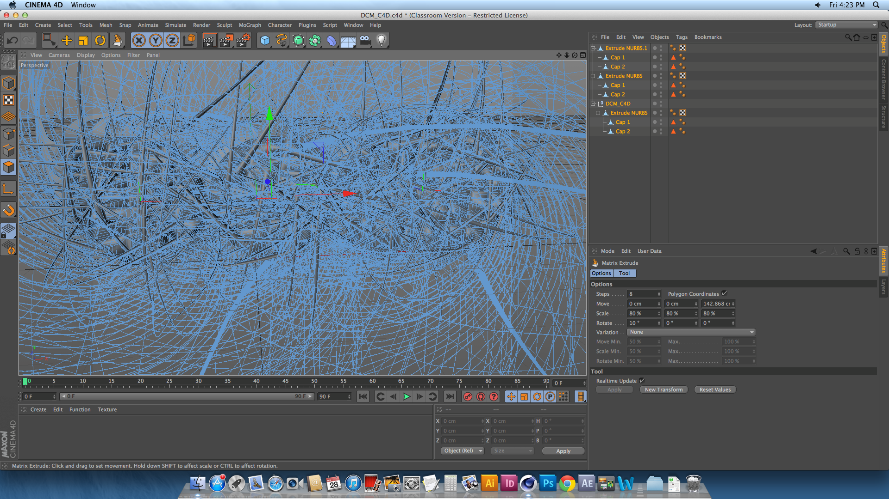
I then made sure the image was editable, and used the knife tool to create cuts across the body of the logo. These cuts would split the shape up fully into separate pieces, whilst keeping the actual shape together, so that it can be altered in many different ways depending on what the user wants. After this made sure that the editable tag was clicked off, and selected the whole piece. I did this by selecting all of the layers on the list to the right of the screen, not on the physical shape itself, to make sure that I was able to select all of the individual pieces of the logo. After I had done this, I then went on to change the shape of the logo drastically, and to do this I went to MESH>CREATE TOOLS> MATRIX EXTRUDE.
This process is usually used to create weird and wonderful shapes like the hair on someone’s head of a 3D model, as well as limbs and pretty much an

y counterpart someone can think of. In this case, I used
the Matrix Extrude to dynamically change the over-all image of this logo, and that is simply done by pulling the tool out and away from the shape. Once the tool is pulled away, every single part of the logo that had been cut up was the extruded and morphed into a heaping mass of spikes and shards, which looked amazing even when it hasn’t been rendered. However, once I did render the image, I was shocked as to how well it all came out. I was able to zoom out of the logo to make more sense of the state of
it.


This is what the final rendered image looks
like. Over all I’m really surprised at how easy it is to make something so simple look so effective. I love the way that each and every individual spike can be seen, and the mass of spiked curves make the image look very mechanic. Because of this, I decided that although  I could make the image look so abstract and messed up by putting in any number of colours, textures and effectors in, I decided to keep the image grey, as I really was taken to the mechanic element that I got from it. 

Sunday, 15 December 2013

Northumberland National Park Competition/ Evaluation.


Northumberland National Park. 


Whilst getting on with my animated short, I was also brought the opportunity to work on a character which would be used in signs and adverts for the Northumberland National Park. This competition was soon ending so I chose to take a few days off the animated short and concentrate on creating this piece ready for the deadline. 

The rules of this competition were that the character has to be a young child, possibly between the ages 5 - 10. I went for around the age of about 7 or 8, as the character would most likely be more independent at that age. 
The character also had to look confident and trust-worthy, as well as outdoors-y and rather adventurous. And I took these rules and put them into characteristics of the drawing. One example of this is her stance, she doesn't have too much of a stereotypically feminine posture, other than her feet turning inwards slightly.


Evaluation.
Creating this piece was a small challenge for me, as well as being something I really enjoyed doing! I took into account my last piece and how airbrushed I thought it was, and decided to go against that completely in this piece. I played around with brushes until I found a thick and contrasting brush setting which allowed me to blend and mould colours together rather than blurring them and taking away any texture. I also really enjoyed the fact I was drawing a little girl rather than a grown woman for a change, as this lead me onto research how a child’s bone structure is on their face, as a lot of children’s faces simply LOOK round and actually aren’t. I also feel as though I chose a rather contrasting colour scheme this time, as opposed to my last piece of personal work, and I think, especially on her face, those colours work really well. I'm rather pleased with how this character turned out, as I don't really focus on drawing children and had to take into account almost everything when I was drawing her. Everything from eye shape, to face shape, to teeth, hair ... everything! But I'm pleased she doesn't look too feminine, and hasn't really been assigned a strong gender role, as this makes her approachable by all ages and genders, and won't appeal to one side more than the other. 

When evaluating this piece, I found a few strengths and weaknesses in my work that I should bring to attention: One of my main strengths in this piece was most definitely my colour and shading, as I felt those aspects were a lot stronger this time around, and they worked well together as both an all-round image and in their individual pieces.  One weakness I found with this image is that although it was to be submitted with just a simple white background, I feel as though I could have done more to this version to make her fit in slightly better with the background, either by just adding a shadow around her feet or back just to make her feel a part of the piece. In the future I think I’ll take this point into consideration when thinking that my image is finished when it may well not be! Even if just adding a shadow, or a source of light could make a big difference to the whole outcome. 


Friday, 1 November 2013

Project 2: Creating my Walk Cycles/ Final Products/ Evaluation.


In Preparation of creating my walk cycle loops for my final animation, I began by studying and
researching various ways that characters walk, and taking into consideration my characters weight, height and specific body parts which would have to be catered for. I searched through a vast amount of walk cycles and character designs, until I got to this little gem.
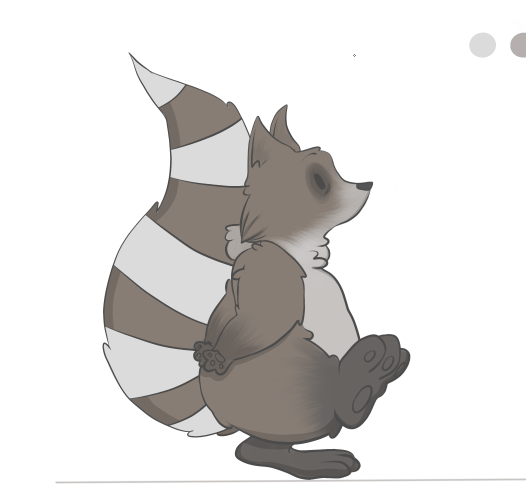
It seemed as though this walk cycle was perfect to help base my characters walk, for a number of reasons. The main one relating to the fact that I wanted my character to be rather short and podgy, and this little bird’s body was rather similar to what I had in mind. I also found that as I was drawing up my own characters body, based on this walk cycle, his belly would move from side to side, as if drawing all attention to it, and making it seem even bigger than it was.
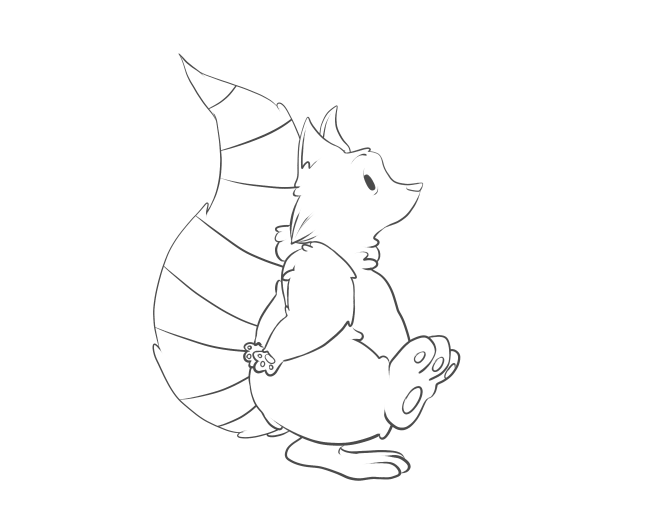
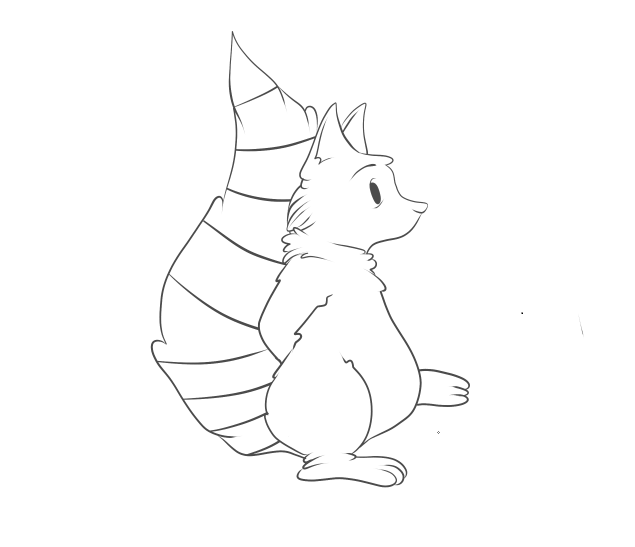
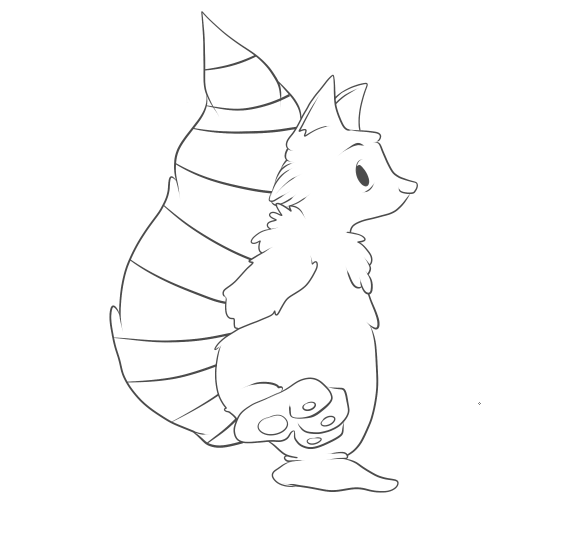
I found it a lot easier to simple draw my walk cycle images straight onto my computer, than doing them traditionally first, this saved so much time when it came to putting them all together. I used a stabilising tool on my pen work, which meant the lines would be a lot more smooth and flowing, and not sketchy like they would have come out by hand. I also chose to keep the outline of my character rather dishevelled, by changing the pressure that I applied to the pen. This made the line-work much more dramatic and somehow added a lot more character to the little raccoon, mostly by the lines being thicker at his arms and tummy, which made them seem more defined and thicker.  I didn’t have any specific difficulties when creating this walk cycle, there were minor changes to make with every frame there was to do. I did find, however, that I was able to keep the line definition the same throughout the cycle, and very easily as well, with thanks to the simple shape or my character.  Seeing as I had something as a base for my character’s walk cycle, it didn’t take me much time to complete my first walk cycle, and decided that because it had been so successful and so time efficient, I would use this loop, as an actual piece in my animation.


After I had created my first successful walk cycle, I decided I wanted to give it a go at colouring it;
I began by making a copy of my set of frames, and used the layering system to use colour on my individual frames, without going over the linework and ruining it. I wanted to start off using basic

colours and working my way up to doing complicated and more detailed colouring. However, I found that my characters colours were rather simple, and to try and simplify them anymore would cause them to not match the style of drawing I had done on them.
Here, it shows my first final frame that has been coloured. I used a base colour in grey/brown, then applied a light blue/white for the tail stripes and the fur on his belly and face. I used a textured brush which I edited to make look like fur, which I think worked very well on his body. I also added a dark grey to black colour on his feet, which worked very successfully and made them look a little dirty, which it turn makes him look more like a wild animal, rather than a house pet.
After I had applied all of his fur, and dark rings around his eyes to make him look both tired and more raccoon-like, I went on to create the shadow around his body. To do this, I made a new layer, turned the opacity down to about 19%, and turned the colour down to pure black. Then, with the stabiliser on max, and the pencil tool (which creates a clicked end) I went over the specific parts of his body.
This image shows in more detail how the shadow looks on the character. I think it works really well, when creating a shadow this way because of its opacity. The colours underneath are still very visible, whereas if I’d simply put a black line as the shadow it would have looked a lot less effective in my opinion. It also makes my character look a lot 3-dimensional, which brings him to life.
After I had completed all 14 of my walk frames, I then adjusted all of my images to ensure they were the same height, width and length, as my animation looked a little bit jumpy when put together.


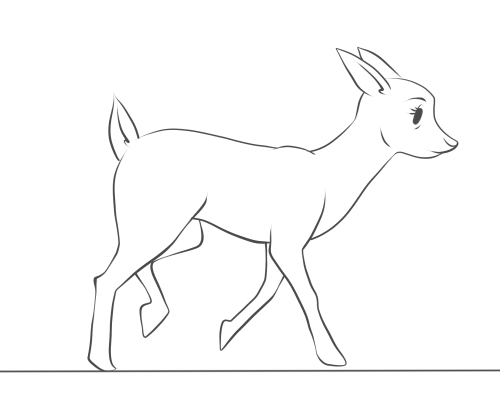
Once I had completed a walk cycle, and applied colour, I thought it best to try and work on one of my more difficult characters. That character being Lola, the fawn friend of Archie’s, and the soon to be killer of Archie as well. I really struggled with putting together an idea of how to make her walk, as I

haven’t ever really drawn deer that much, due to their complicated bodies and stances. So I sought help from gifs of Bambi, which I then broke down and used as bases for my own character! I found this way to be so helpful, and I quickly picked up the specific body parts and areas which would need most defining and emphasis, like I did with my first loop. I didn’t copy the cycle too accurately in this image, as they depict a fully gown deer walking, and I wanted to add the cautiousness and speed of a young fawn.
I found that using the pen tool, again, gave the sleek edge and soft lines that I wanted for this picture, as deer are seen as elegant creatures. I also found it rather challenging to keep an eye on what leg was moving where, and to ensure that I didn’t mess up the walk cycle. I probably could have made it easier for myself by shading or marking one of the front and back legs, to distinguish them from each other.
However, I persevered, and was able to create a full, and working, 20 frame cycle, which shows the deer cautiously walking forward. I added a tiny bit of a head dip to my character, which is JUST noticeable, but I didn’t want to create too much of a fuss with parts of the body other than the legs at the moment. One thing that did bug me about this walk cycle was that the images seemed to get bigger as the frames went on, which is probably down to my poor tracing skills. I managed to correct this by taking each individual frame and used the transform tool to make every single one of them the same size.
This walk cycle, I feel, took a lot more time and concentration than my first loop, simply because of the amount of body parts I had to control.  I feel as though I could easily apply colour to this cycle now, and try and work how the shadows would change as the character moves as well. And I also intend to use this cycle as a base for when I turn my fawn into a zombie like creature, were I can use each frame and edit it to my liking.


Once I had finished my first deer walk cycle, I then went on to using it as a base for the horrific makeover it was about to get;
I started off by drawing a simple line on my canvas, to ensure that all the frames were going to be the same size and I wouldn’t somehow make them all bigger as the frames go on.


I then copied and pasted one frame at a time, adjusting the size so that the character situated itself perfectly on the line. I then “went to town” on erasing parts of the body, and filling them in with different, horrific injuries that I plan on giving to the deer.
I started off with rather simple things, I added bags under her eyes to signify that she had become part of the nocturnal forest, much like her friend the raccoon. I then added a few drops of…whatever was eating her from the inside out, on her mouth and then added bits of the substance dripping from her mouth and swinging in a very mucus-like fashion. Although I’m aware that deer don’t really have eyebrows, or most artists try and blend them into their facial furry features, I altered hers to make her look more angry and demonic than before, and although the eyebrow looks rather placid in this image, it gradually becomes scarier as the frames go on.

I then went on to taking actual chunks out of her body. I knew from the moment I decided that she would “turn,” that I not only wanted to have parts of her body missing, I also wanted her to gain body parts, growths, tumours, boils – those kinds of things. So the gunge that’s eating her from the inside out, finally made an appearance and is shown to be dripping down her neck, were her windpipe and throat would be, I think this looks great, really effective and is actually not nice to look at, rather than making her still look cute with half her body missing, which is a common thing among this genre of animation.
After spending so much time working with her legs, I was a little apprehensive about changing them in any way, but one idea I did have, which kept her leg shape well, was to have a bone sticking out of one of the joints in her front and back legs. I drew a rather crude looking bone sticking out of the joint in her front leg, which looks rather horrible, along with the blood trailing down her leg to add to it. I also made her body lower itself, and go into a little dipping motion when it was time to put pressure on the leg, which I think will make it look a lot more effective and consistent with the frames.
After adding extra bones and effective the movement of my character, I then went on to make the biggest impact of my character;
I decided that to make my character a little bit more 3-dimensional, and I did this by removing almost half a side of my entire character. I wanted to have some ribs and organs showing, as well as making the skin look like it was peeling or dissolving away due to the substance inside of her. Although I want the skin to recede slowly, so I started off with a few cracks and splits in her skin, which I want to develop into larger splits and tears. Showing the ribs was easy enough, as I simple just had three separate spaces which curved down to meet the joint in her front leg.


I then went on to add multiple creases in the edges of her joints and skin. I think this makes the character look a lot more run down, almost as if she was sagging due to the nature of her health. I also added a kind of splat effect print on her hip, I think it kind of lightens the mood on the animation, as I don’t want this animation to be completely horrific! And the creases I think work so well, making her look so much more decrepit and shows just how much she is falling apart, and I also added a graze to the skin on her back leg, just so I could tell the difference between the legs.
The final product of my first frame of this walk cycle looks like this; I am very pleased with the detail I have managed to put into her and how I was able to make her health deteriorate steadily the more she moves. I have adjusted the majority of the frames to ensure that all of them are the same size and have went through her run cycle to make sure that the leg works well also, as I have intended to make it look as though it is limp when she runs. I then applied this to all 20 frames of my original walk cycle.


FINAL OUTCOMES:


Evaluation.
One a whole, I am really pleased with how all of my walk cycles have turned out. I used a digital format to create all of my frames and loops, which I haven’t done before, and experimented with making a gradual change to my character through the loop as well, which required a lot of attention to detail. I think I struggled slightly with keeping my frames all the same size and shape, because I was tracing and tracing and tracing an image constantly, and a result of this problem was the size of the deer's head changing and morphing slightly when in real life it would stick to the same size.
 If I were to do anything different, I would try and trace out all the frames by hand first, to ensure that they were all the same size, and would also have the much smoother and sleeker lines that my hand-done pieces tends to have.