Showing posts with label Design. Show all posts

Saturday, 19 April 2014

Anxiety Awareness Week 2014

Brief:
Since Anxiety is something that effects almost every aspect of my life, I decided that since Anxiety awareness week was coming up soon, I would do something to recognise this, as well as try to possibly educate, through a visual means, what life is like when suffering from this. I knew this would be an iffy subject to go over, as I never like fully discussing what happens when I experience anxiety, but obviously drawing an illustration is heaps better than sitting down and trying to explain to someone what it’s like.

Evaluation:
 I knew straight away that I wanted this to be a pure black and white, pure and simple, without anything to distract the viewer from the main parts of this image. I also chose to complete this illustration in pencil, as I think keeping things simple and pure it the best way to get a message across. I started off with a really basic sketch, and wasn’t sure if I was going to actually out any features on the face of my character, simply because there isn’t a defining face for who anxiety and depression can happen to. But I did end up choosing to put a face, which I suppose looks a little bit like my own (but not intentionally) just to make it a little more personal. I wasn’t quite sure on how to depict anxiety as an actual subject for about three days, as trying to describe it to someone is difficult enough, but the defining word that stood out whenever I’ve tried to describe it is “gripping” and “something that can just cling to you for hours,” and this gave me the idea for a talon, as its scary, sharp and strong enough to project the power that anxiety can have over someone.
There are plenty strengths and weaknesses in this piece for me to pick out. A strength that is most obvious to me is my line work, and I really enjoy using line density to add character and an overall theme to my work. I have a pretty steady hand and am able to create the long flowing streaks in her hair and eyelashes, but am also able to make the bold and angled lines on the talons gripping her hair. Although one of my weaknesses is my trademark “female face” that I use in literally all of my work, and I WOULD like to sometime soon just concentrate on drawing males more, and depict different looking people rather than my “default face.”

I think the skills I have shown in this piece are skills I would really like to take on with me through to later work, and I think I could achieve this by going back to doing more traditional sketch work before putting my work on digitally, as now I tend to just do my work straight away in a digital format. I think this was inspired slightly through researching Dave Correia's work online, as I found that his way of showing so much detail an using a traditional workflow at that. 

Thursday, 3 April 2014

Re-creating my Storyboards.


I decided that, because I didn't get a chance to finish off my animation, I would take it upon myself to re-create the storyboards I had created to a better quality and making them look more professional. I have recreated the set up from scene 2- my animation, and have used screen shots from my actual first scene of my animation as well. 


Evaluation.
I found from recreating these pieces, that I gained a bit more knowledge into how colour schemes can look really effective, especially in an animation like this. The fact I have taken proper time to recreate certain pieces, such as the set from scene 2, and the characters themselves, makes the whole thing look so much more clean and tidy, and I'm really pleased to have it as a piece to represent my work. I am particularly pleased with an idea I had in order to make it look as though there were a 
corridor of trees in the 3rd storyboard, by simply free-deforming the image of the second scene and painting over it.

On the whole I really am pleased with this piece, it gives a much better idea as to what I wanted from my animation and speaks to a much higher and professional looking quality! 


Friday, 28 March 2014

Live Project Week 1 Reflections.

UPDATES:


Monday 24th of March: Have been in correspondence with client and have brought up a number of ideas, which they approved of. Had the idea to bring up a Surfing theme behind the “7th Wave” name – will look into water patterns and surfboard designs to put into practice.

Tuesday 25th of March: Drew up 4 ideas, rather than the initial 3, in order to show specific details and changes through the ideas. I chose to go rather literal with what they asked for, rather than giving my own interpretation of it, as they were quite clear in what they asked for. 


Client was pleased with these outcomes, although I did urge them to point out ANYTHING they felt was out of place, and no offence would be taken it they didn't like or approve of anything. 


The same day they emailed me back which one they wanted and drew on necessary changes that they would like to be applied, which were few, but would make a large change to the layout of the logo. They also stated they would like the colours to be ever-so-slightly more vibrant against the grainy background.


Wednesday 26th of March: Once I had received the feedback from the client, I then went on to make the changes they had asked for, which included enhanced colour and changing position of a few of the individual pieces, and this was the final outcome. 

Thursday 27th of March: Went to meet up with the client in person with regards to another logo that they wanted me to design. From that meeting I took away the relevant information to design a logo based on a comic-book style, onomatopoeic piece. And straight away I looked into a mixture of  

Batman slapstick noises and the works of  Roy Lichtenstein. I came up with these ideas initially, but decided to go all out and look over  a range of fonts, baring in mind I had to stick with these colours. I also found that the image on the left was rather difficult to read, as the colours 
blended in together and the outline wasn't thick  enough to distinguish the letters from the background. 


I then decided to try out a different font, which could distinguish between the font and the background colour. I personally think that this font is so much better than the previously used one, however, a meet up with the client is still needed in order to see their opinion on it. 

Friday 28th of March: Met up with the client to discuss the ideas that I already had. And upon reflection, the client asked me to try out a few ideas from a totally opposite approach, something along the lines of a more clinical theme. 


Friday, 21 February 2014

Project 4: Week 4 - Creating abstract shapes in Cinema 4D/ Evaluations.

Here, I have attempted to make an abstract shape in Cinema 4D, this process will be worked into my
footage when creating my idents. As one of the aspects of our task is to create 3D, abstract shapes which can be put into the footage, much like Kandinsky’s artwork, where the emotions given off in films can be put onto screen as shapes, colours and movements.
To begin my task of creating a simple abstract shape, I opened up Cinema 4D and went to the “Spline” tool and used it’s freehand option to draw a random squiggle on the composition, and then blew up the thickness of the shape to make it more 3D and to give it more body.  
Once I had completed this aspect, I went on to add some effectors to the shape, and one of the effects I added to the spline was “Random,” which made the image split out and spread more. And another effect that I decided to add onto the shape was the “Formula,” effect, this effect made the shape have a much softer edge. This effect also changed the way that the shape moved, when I pressed play on the timeline. I think this was a really effective thing to try out, as it made a rather still and stark shape seem much more like an organism and gave it a much more professional look rather than a generic computer-generated image.

I then went on to add some more effectors to my shape. I wanted my shape to resemble some sort of swirl, so I added the effector named “Twist,” which resembled a circular tool on the screen, and when I changed the scale, position and rotation of this circle, it would alter the vastness of the change towards the shape. It also made the shape twist, obviously, and turn into a sort of vortex which looked really effective. Although once I had done this, I realised that the shape was too close together, so to alter this I put in another effector what was named “Explosion,” so you can only guess what that did to the shape. The rules of “Explosion,” were exactly the same as the rules in “Twist,” where if a changed any value of the circle that would affect the shapes dynamics. This made the shape look much more alive and full of character.


I then went on to add music to this shape, as I wanted to see it react and move with beats of music, so I went to “MOGRAPH>EFFECTOR>SOUND,” this brought up a box where I added a music file. I then pressed play on my timeline, and it showed the shape changing and morphing to the different beats that the music was giving off which I thought looked really cool. But I then decided that I didn’t want to just have the whole shape moving at the same time. So I went to “Strength,” down the bottom of the box and clicked on “All,” here I changed it to “Step,” so that different pieces of the shape would move at different beats to the music, which looked so much better.
 
This is what my result was of this test, and over all I am happy with the outcome. The shape expands and contracts with different parts of it’s body, in time to music and I think this looks really effective, and resembles a beating heart somewhat. The “shattered” effect that this shape displays looks really edgy, and the twisted look to it also makes it look as though it’s some sort of sharp tornado.

I then went on to try and make shapes out of ready-made and 3D objects on cinema 4D, and one of these tests I did started off where I uploaded a 3D shape of the DCM logo onto a new file.
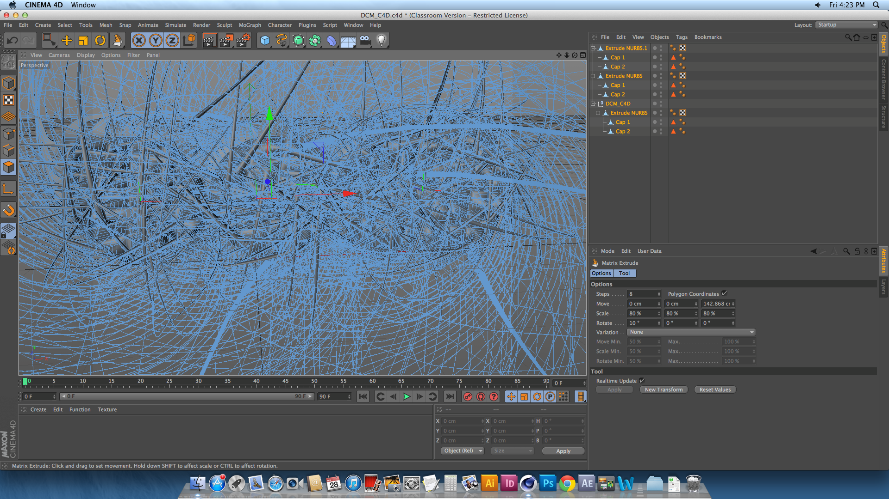
I then made sure the image was editable, and used the knife tool to create cuts across the body of the logo. These cuts would split the shape up fully into separate pieces, whilst keeping the actual shape together, so that it can be altered in many different ways depending on what the user wants. After this made sure that the editable tag was clicked off, and selected the whole piece. I did this by selecting all of the layers on the list to the right of the screen, not on the physical shape itself, to make sure that I was able to select all of the individual pieces of the logo. After I had done this, I then went on to change the shape of the logo drastically, and to do this I went to MESH>CREATE TOOLS> MATRIX EXTRUDE.
This process is usually used to create weird and wonderful shapes like the hair on someone’s head of a 3D model, as well as limbs and pretty much an

y counterpart someone can think of. In this case, I used
the Matrix Extrude to dynamically change the over-all image of this logo, and that is simply done by pulling the tool out and away from the shape. Once the tool is pulled away, every single part of the logo that had been cut up was the extruded and morphed into a heaping mass of spikes and shards, which looked amazing even when it hasn’t been rendered. However, once I did render the image, I was shocked as to how well it all came out. I was able to zoom out of the logo to make more sense of the state of
it.


This is what the final rendered image looks
like. Over all I’m really surprised at how easy it is to make something so simple look so effective. I love the way that each and every individual spike can be seen, and the mass of spiked curves make the image look very mechanic. Because of this, I decided that although  I could make the image look so abstract and messed up by putting in any number of colours, textures and effectors in, I decided to keep the image grey, as I really was taken to the mechanic element that I got from it. 

Friday, 6 December 2013

Project 3: Creating my Characters and assets for Scene 2.

Drawing Out Characters.


I started out in this part of the project by sketching out ways in which I thought my character would look when he was sitting and walking, particularly from multiple views. 
I soon realised, as you can see from this image, that drawing something coming at you head on isn't as easy as one would think, and I took a good four or five attempts at it before I got anywhere near what I was looking for. 


I also had a crack at drawing my little raccoon character in a sitting position and see if I could draw him, stage by stage, getting up and into a walk cycle. 

I found this task rather daunting, as there was no denying it would take a long time, and instead made his legs a lot smaller and decided that sitting could well be just standing if drawn right. 

Once I had his sideways poses sorted, I then went on to try and tackle his front walk cycle. I looked through a few sources on the internet designed to help with walk cycles from al perspectives, and I eventually found one which helped!

 This tutorial stated that from a front walk cycle, if one wanted to, they could keep the characters body at a stand still and only move their legs, and when crouches and lunges were made, just lower the height of the body.

I tried this out and was over the moon when it worked! not only was it so much more simple to do, but it looked so much smoother as well! And as with all the walk cycles I'm doing, I have created them using multiple frames on Photoshop's animation timeline. 

I also realised that I could simply re-use assets that I had made in scene 1, such as the trees, rocks and skulls, so that it would appear to be the same forest! 


Sunday, 27 October 2013

Project 2: Week 2 Reflections.

Week 2 Reflections.


Days:
Monday 21st
Tuesday 
22nd
Wednesday 23rd
Thursday 24th
Friday 
25th
Saturday
26th
Sunday 27th
Work to Complete
Begin sketches out character's defining features related to walk. 
Finish deer and raccoon walk cycle sketches
Digitally line all four walk cycles. 


Digitally line all four walk cycles. 
CAD Session & more research for blog alone. 

Documentation.
Colour up walk cycles at home.  
Reflection.
Colour up walk cycles at home. 


This week, I assigned myself to the task of completing my walk cycles for two of my main characters. I planned on using a mix between Paint Tool Sai and Photoshop for this, but found out I could complete the task purely on Paint Tool Sai, which made it much easier to complete at home. 

Monday 21st October: Began drawing out specific parts in my character's body in different parts of the walk cycle. Aspects such as the feet, tail and belly, which would be the main parts in the characters walk cycle that would be effected.

Tuesday 22nd October: I finished up the main sketches and then put them only my computer to draw up digitally. 

Wednesday 23rd October: I spent the day finishing the line work for my 3 walk cycles. 


Thursday 17th October: I spent the day finishing the line work for my 3 walk cycles. 


Friday 18th October: Had CAD session where I showed David my 3 walk cycles, and was asked to do one more, possibly depicting the walk cycle of the fawn in my animation, once it had been infected and turned into a zombie. Also took part in class animation, where we started off one character each, and passed it around the class to let others change and morph them, was a really fun exercise!


Sunday, 6 October 2013

Project 1: Week 1 Reflections.

Week 1 Reflections. 


Days:
Monday 30th
Tuesday 
1st
Wednesday 2nd
Thursday 3rd
Friday 
4th
Saturday 5th
Sunday 6th
Work to Complete
Brainstorm and decide on an over all "theme" for my animation. 
Look into Disney and Dream Works - Heroes.
research- Unlikely Heroes.
Look into small but mighty heroes!

Look into small but mighty heroes!
Finish Research of characters and begin brainstorming aesthetics. 
Documentation. 
Reflection.


This week I gave myself the task of concentrating on researching well-known existing characters that could influence the designs of my own character that I need to create for my animation this year. 

Monday 30th September:  I decided on a vague storyline for my animation, which was going to be a mock up of a small Disney animation. My character would be small, fluffy and mighty!.

Tuesday 1st October: I limited my research down to "Unlikely" heroes. I looked closely at characters who also had little to no speech, and mainly used their facial expressions and small noises to communicate. These characters ended up being animals.

Wednesday 2nd & Thursday 3rd October: Looked into "Small and Mighty" heroes, these included charcters like Scooby Doo, Meeko from Pochahontas, and Scrat, the prehistoric squirrel from Ice Age.

Friday 4th October: Finished research and started to think of possible animals my character could be.