Showing posts with label illustrator. Show all posts

Saturday, 19 April 2014

Anxiety Awareness Week 2014

Brief:
Since Anxiety is something that effects almost every aspect of my life, I decided that since Anxiety awareness week was coming up soon, I would do something to recognise this, as well as try to possibly educate, through a visual means, what life is like when suffering from this. I knew this would be an iffy subject to go over, as I never like fully discussing what happens when I experience anxiety, but obviously drawing an illustration is heaps better than sitting down and trying to explain to someone what it’s like.

Evaluation:
 I knew straight away that I wanted this to be a pure black and white, pure and simple, without anything to distract the viewer from the main parts of this image. I also chose to complete this illustration in pencil, as I think keeping things simple and pure it the best way to get a message across. I started off with a really basic sketch, and wasn’t sure if I was going to actually out any features on the face of my character, simply because there isn’t a defining face for who anxiety and depression can happen to. But I did end up choosing to put a face, which I suppose looks a little bit like my own (but not intentionally) just to make it a little more personal. I wasn’t quite sure on how to depict anxiety as an actual subject for about three days, as trying to describe it to someone is difficult enough, but the defining word that stood out whenever I’ve tried to describe it is “gripping” and “something that can just cling to you for hours,” and this gave me the idea for a talon, as its scary, sharp and strong enough to project the power that anxiety can have over someone.
There are plenty strengths and weaknesses in this piece for me to pick out. A strength that is most obvious to me is my line work, and I really enjoy using line density to add character and an overall theme to my work. I have a pretty steady hand and am able to create the long flowing streaks in her hair and eyelashes, but am also able to make the bold and angled lines on the talons gripping her hair. Although one of my weaknesses is my trademark “female face” that I use in literally all of my work, and I WOULD like to sometime soon just concentrate on drawing males more, and depict different looking people rather than my “default face.”

I think the skills I have shown in this piece are skills I would really like to take on with me through to later work, and I think I could achieve this by going back to doing more traditional sketch work before putting my work on digitally, as now I tend to just do my work straight away in a digital format. I think this was inspired slightly through researching Dave Correia's work online, as I found that his way of showing so much detail an using a traditional workflow at that. 

Monday, 14 April 2014

Making a Society6 Page.

In the last three months I've had more and more requests about people buying my artwork, and although this is insanely flattering, it's something I also worry about quite a lot, purely because I can't/don't leave my house very much and wouldn't want to set commitments I'm afraid I couldn't keep. 
However, my classmates, Kym and Danielle showed me THIS beauty, where the company take off a percentage of what I would earn, in order for them to distribute, mail out and create the prints/accessories I upload! As I'm not too bothered about making a lot of money from this, it's just nice to know it's something that's taken care of and I don't have to panic over.


Tuesday, 18 March 2014

Creating a Facebook Page.

Last summer I chose to try and get my work out there more and make a Facebook page for my Artwork; 


I was rather hesitant about making something like this, purely because of my lack of confidence and scared of what people I know in real life may think of it. But I thought I might as well try and say I've done it. 


Looking back on how many people have taken an interest in it, how many requests for Artwork, and friends I've made over-seas from this page, I think it has been a real success and probably one of the best decisions I've made this year. I also think that it has given me a lot more confidence with the work I produce, as well as taking any criticisms on my work.  

My Page can be found at https://www.facebook.com/EmmaInglisIllustrations


Wednesday, 12 March 2014

Dave Correia


Dave Correia is an American Artist, who partly runs the company Zero Friends, along side Alex Pardee. 

I find Correia's work to have a very distinct style, one that can't really be confused with many others and this works greatly in his favour. His style encompasses very delicate paint work, and usually is usually very figure based, them being the centre of the attention and the main focus of the piece. I wouldn't say Correia's work is an example of new techniques with regards to painting, however, it is clear to see that he has been heavily influenced by comic books, video games and horror books, which are very popular in his pieces with regards to content and style. He is also able to play the harsh comic book style down well with his soft pastel colours which contrast with his content so well, making them seem more "delightfully dead" rather then gory and non-aesthetically pleasing.
Photo: From Dave Correia...
Large painting. Late night. Long way to go.
SPECTACULAR WIP.......... <3 
Although Correia's work could well pass as digital work, his workflow actually consists of traditional methods. His immense attention to detail enables him to provide a both life-like and fantasy explosion of textured and deep images depicting all manner of shocking yet beautiful imagery, all brought together by outstanding colour schemes. He doesn't seem to have any boundaries when it comes to what he paints, as he doesn't seem to have a set theme of what to create other than including the heavily detailed skin/fabric, which shows rolls and creases so well. 

I feel as though researching through Correia's work has definitely influenced me to start drawing and painting more traditionally,
mainly because I think I can achieve a bit more control over my traditional work, and sometimes using only digital workflow can hinder my concentration and I would be more likely to get sidetracked with other ideas. Another aspect I really love about Correia's work, and what I would like to apply to my own, would be his use of symmetry and using that aspect to fill in space that would otherwise be left untouched.
 I have a habit of creating rather strong figures in my work, but then lack largely in my attempts at backgrounds and scenery, and this is also something I would like to focus on in the future.


Sunday, 9 March 2014

Project 4: Week 6 Reflections.

Week 6 Reflections.


Days:
Monday 
3rd
Tuesday 
4th
Wednesday 
5th
Thursday 
6th
Friday 
7th
Saturday
8th
Sunday 
9th
Work to Complete
Continue with my documentation.
Finish off my 3rd ident, and render out onto my hard drive. 
Finish documentation and put together 3 Idents in folder for hand in.. 
HAND IN.

Documentation
Reflection.

This week I will be concentrating on creating my last ident, completing my documentation and handing in my work. 


Monday 3rd March: - Completed all my documentation up to date 

Tuesday 4th March:  Continued with animating my third ident and completed it to render out. 

Wednesday 5th March: Gathered all of my work together and prepared for print, as well as finishing off documentation. 

Thursday 6th March: Printed out documentation and had everything ready for hand in.

Friday 7th March: HAND IN.

Monday, 3 March 2014

Project 4: Week 6 Plan - 03/03/14

Project 4: Compositing.
For this project I have been given the task of developing my animation, compositing and editing skills which will inform my studio practice. This will involve me animating and compositing elements to form a concise series of 3 idents for an intended use of broadcasting. 

Monday, 3rd of February:
This week I will be concentrating on creating my last ident, completing my documentation and handing in my work. 


Days:
Monday 
3rd
Tuesday 
4th
Wednesday 
5th
Thursday 
6th
Friday 
7th
Saturday
8th
Sunday 
9th
Work to Complete
Continue with my documentation.
Finish off my 3rd ident, and render out onto my hard drive. 
Finish documentation and put together 3 Idents in folder for hand in.. 
HAND IN.

Documentation
Reflection.

Sunday, 2 March 2014

Project 4: Week 5 Reflections.

Week 5 Reflections.


Days:
Monday 
24th
Tuesday 
25th
Wednesday 26th
Thursday 
27th
Friday 
28th
Saturday
1st
Sunday 
2nd
Work to Complete
Back up files all onto Portable Hard Drive.  
Upload all of my assets to After Effects and begin first ident!
Finish first ident and render out 5 seconds. 
Upload all of my assets to After Effects and begin filming second ident! 
CAD session and update blog. Finish filming 2nd ident and begin 3rd.

Documentation
Reflection.

This week I will be concentrating on creating my 3 idents, as I have all the components ready for them to be made.

Monday 24th February: - Backed up every single file onto my hard drive and re-arranged files to have more structure. 

Tuesday 25th February:  Put all of my selected files onto After Effects and began animating my first ident, which was Anxiety. 

Wednesday 26th February: I finished off my first Ident and rendered out 5 seconds of it. 

Thursday 27th February: Uploaded all my assets to After Effects and began animating my second ident which was Euphoria.

Friday 28th February: CAD session and update blog, as well as finishing off my second ident and rendering out. 

Monday, 24 February 2014

Project 4: Week 5 Plan - 24/02/14

Project 4: Compositing.
For this project I have been given the task of developing my animation, compositing and editing skills which will inform my studio practice. This will involve me animating and compositing elements to form a concise series of 3 idents for an intended use of broadcasting. 

Monday, 24th of February:
This week I will be concentrating on creating my 3 idents, as I have all the components ready for them to be made.


Days:
Monday 
24th
Tuesday 
25thth
Wednesday 26th
Thursday 
27th
Friday 
28th
Saturday
1st
Sunday 
2nd
Work to Complete
Back up files all onto Portable Hard Drive.  
Upload all of my assets to After Effects and begin first ident!
Finish first ident and render out 5 seconds. 
Upload all of my assets to After Effects and begin filming second ident! 
CAD session and update blog. Finish filming 2nd ident and begin 3rd.

Documentation
Reflection.

Sunday, 23 February 2014

Project 4: Week 4 Reflections.

Week 4 Reflections.


Days:
Monday 
17th
Tuesday 
18th
Wednesday 19th
Thursday 
20th
Friday 
21st
Saturday
22nd
Sunday 
23rd
Work to Complete
Finish documentation on mock stills. 
CAD session on how to make abstract shapes in C4D
Continue making shapes using the techniques Paul taught us.
Shoot footage based on what emotions I have chosen. 
CAD session and update blog.  

Documentation
Reflection.
This week I will be taken through how to make abstract shapes and sounds in Cinema 4D using simple tools, and also go out and shoot some final footage for my idents.

Monday 17th February: - Finished all my documentation on how I made my stills. 

Tuesday 18th February:  Looked at abstract shapes and how to make them with Paul in CAD.

Wednesday 19th February: Went and made a few of my own shapes that related well to my chosen emotions.

Thursday 20th February: Went and shot film at home that I can use for my Idents. 

Friday 21st February: CAD session and update blog.

Friday, 21 February 2014

Project 4: Week 4 - Creating abstract shapes in Cinema 4D/ Evaluations.

Here, I have attempted to make an abstract shape in Cinema 4D, this process will be worked into my
footage when creating my idents. As one of the aspects of our task is to create 3D, abstract shapes which can be put into the footage, much like Kandinsky’s artwork, where the emotions given off in films can be put onto screen as shapes, colours and movements.
To begin my task of creating a simple abstract shape, I opened up Cinema 4D and went to the “Spline” tool and used it’s freehand option to draw a random squiggle on the composition, and then blew up the thickness of the shape to make it more 3D and to give it more body.  
Once I had completed this aspect, I went on to add some effectors to the shape, and one of the effects I added to the spline was “Random,” which made the image split out and spread more. And another effect that I decided to add onto the shape was the “Formula,” effect, this effect made the shape have a much softer edge. This effect also changed the way that the shape moved, when I pressed play on the timeline. I think this was a really effective thing to try out, as it made a rather still and stark shape seem much more like an organism and gave it a much more professional look rather than a generic computer-generated image.

I then went on to add some more effectors to my shape. I wanted my shape to resemble some sort of swirl, so I added the effector named “Twist,” which resembled a circular tool on the screen, and when I changed the scale, position and rotation of this circle, it would alter the vastness of the change towards the shape. It also made the shape twist, obviously, and turn into a sort of vortex which looked really effective. Although once I had done this, I realised that the shape was too close together, so to alter this I put in another effector what was named “Explosion,” so you can only guess what that did to the shape. The rules of “Explosion,” were exactly the same as the rules in “Twist,” where if a changed any value of the circle that would affect the shapes dynamics. This made the shape look much more alive and full of character.


I then went on to add music to this shape, as I wanted to see it react and move with beats of music, so I went to “MOGRAPH>EFFECTOR>SOUND,” this brought up a box where I added a music file. I then pressed play on my timeline, and it showed the shape changing and morphing to the different beats that the music was giving off which I thought looked really cool. But I then decided that I didn’t want to just have the whole shape moving at the same time. So I went to “Strength,” down the bottom of the box and clicked on “All,” here I changed it to “Step,” so that different pieces of the shape would move at different beats to the music, which looked so much better.
 
This is what my result was of this test, and over all I am happy with the outcome. The shape expands and contracts with different parts of it’s body, in time to music and I think this looks really effective, and resembles a beating heart somewhat. The “shattered” effect that this shape displays looks really edgy, and the twisted look to it also makes it look as though it’s some sort of sharp tornado.

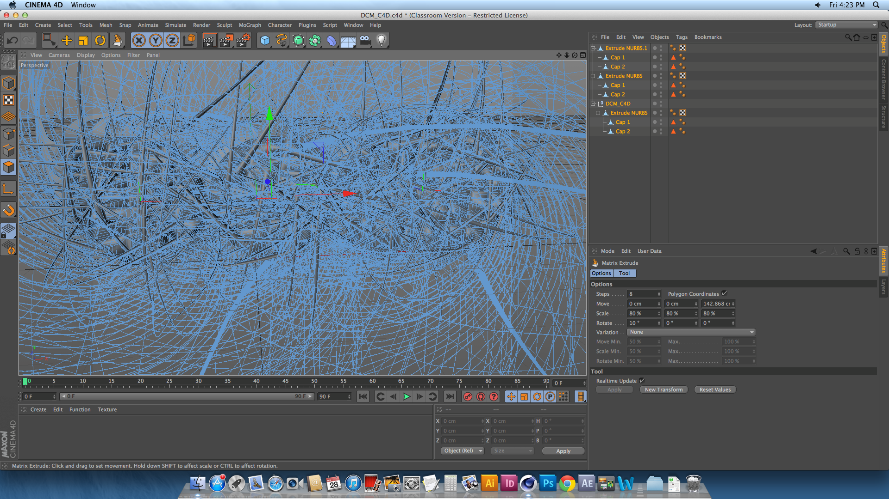
I then went on to try and make shapes out of ready-made and 3D objects on cinema 4D, and one of these tests I did started off where I uploaded a 3D shape of the DCM logo onto a new file.
I then made sure the image was editable, and used the knife tool to create cuts across the body of the logo. These cuts would split the shape up fully into separate pieces, whilst keeping the actual shape together, so that it can be altered in many different ways depending on what the user wants. After this made sure that the editable tag was clicked off, and selected the whole piece. I did this by selecting all of the layers on the list to the right of the screen, not on the physical shape itself, to make sure that I was able to select all of the individual pieces of the logo. After I had done this, I then went on to change the shape of the logo drastically, and to do this I went to MESH>CREATE TOOLS> MATRIX EXTRUDE.
This process is usually used to create weird and wonderful shapes like the hair on someone’s head of a 3D model, as well as limbs and pretty much an

y counterpart someone can think of. In this case, I used
the Matrix Extrude to dynamically change the over-all image of this logo, and that is simply done by pulling the tool out and away from the shape. Once the tool is pulled away, every single part of the logo that had been cut up was the extruded and morphed into a heaping mass of spikes and shards, which looked amazing even when it hasn’t been rendered. However, once I did render the image, I was shocked as to how well it all came out. I was able to zoom out of the logo to make more sense of the state of
it.


This is what the final rendered image looks
like. Over all I’m really surprised at how easy it is to make something so simple look so effective. I love the way that each and every individual spike can be seen, and the mass of spiked curves make the image look very mechanic. Because of this, I decided that although  I could make the image look so abstract and messed up by putting in any number of colours, textures and effectors in, I decided to keep the image grey, as I really was taken to the mechanic element that I got from it. 

Monday, 17 February 2014

Project 4: Week 4 Plan - 17/02/14

Project 4: Compositing.
For this project I have been given the task of developing my animation, compositing and editing skills which will inform my studio practice. This will involve me animating and compositing elements to form a concise series of 3 idents for an intended use of broadcasting. 

Monday, 17th of February:
This week I will be taken through how to make abstract shapes and sounds in Cinema 4D using simple tools, and also go out and shoot some final footage for my idents.


Days:
Monday 17th
Tuesday 
18th
Wednesday 19th
Thursday 
20th
Friday 
21st
Saturday
22nd
Sunday 
23rd
Work to Complete
Finish documentation on mock stills. 
CAD session on how to make abstract shapes in C4D
Continue making shapes using the techniques Paul taught us.
Shoot footage based on what emotions I have chosen. 
CAD session and update blog.  

Documentation
Reflection.

Sunday, 16 February 2014

Project 4: Week 3 Reflections.

Week 3 Reflections.


Days:
Monday 10th
Tuesday 
11th
Wednesday 12th
Thursday 
13th
Friday 
14th
Saturday
15th
Sunday 
16th
Work to Complete
Render out final images of test compositing.
Take still images, and find images off internet to make mock still of ident.
Put together images using layer sequence in Photoshop. 
CAD session and update blog.  

Documentation
Reflection.
This week I will be creating my own stills in the style of the Digital Cinema Media idents, with images both of my own and from the internet. 


Monday 10th February: - I was able to render out a final Image for showing and to put into my documentation. 

Tuesday 11th February:  Took images, not scenic ones (I focused more on set ups) to use for my ident mock stills.

Wednesday 12th February: Looked on the internet for some darker images for the different emotions for my mock stills.

Thursday 13th February: Put stills together in Photoshop.

Friday 14th February: CAD session and update blog.

Monday, 10 February 2014

Project 4: Week 3 Plan - 10/02/14

Project 4: Compositing.
For this project I have been given the task of developing my animation, compositing and editing skills which will inform my studio practice. This will involve me animating and compositing elements to form a concise series of 3 idents for an intended use of broadcasting. 

Monday, 10th of February:
This week I will be creating my own stills in the style of the Digital Cinema Media idents, with images both of my own and from the internet. 


Days:
Monday 10th
Tuesday 
11th
Wednesday 12th
Thursday 
13th
Friday 
14th
Saturday
15th
Sunday 
16th
Work to Complete
Render out final images of test compositing.
Take still images, and find images off internet to make mock still of ident.
Put together images using layer sequence in Photoshop. 
CAD session and update blog.  

Documentation
Reflection.

Sunday, 9 February 2014

Project 4: Week 2 Reflections.

Week 2 Reflections.


Days:
Monday 3rd
Tuesday 
4th
Wednesday 5th
Thursday 
6th
Friday 
7th
Saturday
8th
Sunday 
9th
Work to Complete
Finish off beginnings of research.
Go out and take footage to do a mock up of compositing.. 
Take images with camera as well as footage for still compositions.
Begin session of compositing in CAD.
CAD session and update blog + compositing. 

Documentation
Reflection.
This week I will be getting all kinds of images to put into cinema 4D and use to composite shapes onto.


Monday 3rd February: - Finalised initial research and typed up in word document. 

Tuesday 4th February:  Went out around Newcastle to try and find footage to shoot, also looked for things with reflective surface.

Wednesday 5th February: Went around Berwick to look for footage to shoot, ended up shooting stuff in my garden.

Thursday 6th February: Looked up compositing on Greyscale Gorilla, edited footage down to reduce file size.

Friday 7th February: CAD session and update blog + Began to composite.


Wednesday, 5 February 2014

Amy Sol; Moth’s Poem, (2012.)


Amy Sol’s 2012 piece, entitled “Moth’s Poem,” was a piece that, I think, could be one of the most influential pieces I’ve seen this year. It answers so many questions and query’s that I have had about traditional work and applying the style to when working on a digital format  and being able to make sophisticated background, as that part of digital and traditional art is where I seem to have most problems.
I don’t feel there’s much of a background story to this image, and it seems to be more of a piece dedicated to just being something peaceful and serene whilst being looked at, which is another aspect that I would love to apply to my own artwork.
The image does not contain any thick black lines or sharp marks to indicate any change in character or texture, but considering how well these colours all seem to fit together, I love how they are also so contrasting from each other, so that different layers, aspects and characters are defined from each other so well.
Technically, this piece clearly shows the amount of time and effort put into it, not just during the production of this piece but what she has applied to the piece once it has been done. For example she shows that after she had completed the hair of her main character, having painted it in oil paint meaning it would remain wet for a long while, she was able to blend a much lighter colour into it in order to give that shine and haze, which looks so realistic and as though sunlight is poking through the many vines that surround her.

I feel as though this piece’s main influence on me would be backgrounds. I have the most trouble when it comes to artwork, with backgrounds as I never feel confident enough to go create/ produce an outlined piece of work with a background in it. However using this image has made me realize that simplicity could well be the key to me starting off my background artwork, which in turn has given me a lot more confidence!
Another aspect of this image that I would take away and apply to my own work would be colour schemes. I always feel as though my work looks a lot better when it’s simply lined out, instead of having colour on them, and for some reason never am able to find the colours that fit together, however I’ve found that pencil and paints go in an order of shades of colours, may well help my skills when it comes to colouring my work.

Monday, 3 February 2014

Project 4: Week 2 Plan - 03/02/14

Project 4: Compositing.
For this project I have been given the task of developing my animation, compositing and editing skills which will inform my studio practice. This will involve me animating and compositing elements to form a concise series of 3 idents for an intended use of broadcasting. 

Monday, 3rd of February:
This week I will be brain storming as to what kind of emotions I want to base my 3 idents on, and begin sessions on compositing, as well as taking my own footage to composite on. 


Days:
Monday 3rd
Tuesday 
4th
Wednesday 5th
Thursday 
6th
Friday 
7th
Saturday
8th
Sunday 
9th
Work to Complete
Finish off beginnings of research.
Go out and take footage to do a mock up of compositing.. 
Take images with camera as well as footage for still compositions.
Begin session of compositing in CAD.
CAD session and update blog + compositing. 

Documentation
Reflection.