Showing posts with label 3D work. Show all posts

Friday, 7 March 2014

Project 4: Week - My Final Idents/ Evaluations.


Evaluation of Using Cinema 4D.
For this project, we were asked to create 3, 5 second idents, containing mixed media and high definition live footage to put together as a group for the DCM (Digital Cinema Media) 2014 Ident competition, To do this, we would have show our detailed workflow containing our efforts of creating abstract footage, compositing it in Cinema 4D onto live footage that we have shot ourselves, and then display our hand at post production editing in Adobe After Effects.
As a whole I think the word that I can use to describe my time using Cinema 4D is perseverance, as I'm never rellay that confident with using this program and am usually reluctant to go further than I need to with it. But using all the different effectors and tools to morph and create shapes of literally anything I could think of, really made me much more confident with using this piece of equipment.
One of the issues I had with Cinema 4D was being afraid of just messing something good up that I had created, as we are always told to just play around with the program and “do what feels right.” However, this time, especially when creating my creatures for the Euphoric piece, I totally agree that using as many different ways to create something as you can is just a golden rule that one must abide by to get anywhere with this kind of software. 
I also am very reluctant to use anything considered close to “abstract” so this module was definitely a challenge. Despite this, I really enjoyed focusing on creating pieces of footage that didn't have to be based on anything real, because a lot of the time I would never get the subject perfect, just close to what it was meant to be, and in this case there weren't any rules like that.
In the future, I am to handle equipment like this much more confidently, and not being afraid to mess anything up as there is literally an “Undo” button on the top of the screen. I also want to continue using abstract footage and using compositing techniques in order to create more intricate and detailed pieces of work.
Evaluation of using Adobe AfterEffects.
For this project, we were asked to create 3, 5 second idents, containing mixed media and high definition live footage to put together as a group for the DCM (Digital Cinema Media) 2014 Ident competition, To do this, we would have show our detailed workflow containing our efforts of creating abstract footage, compositing it in Cinema 4D onto live footage that we have shot ourselves, and then display our hand at post production editing in Adobe After Effects.
As a whole I think I have adjusted to AfterEffects really well, and have learned that there is so much more to post production that editing footage together. I have gained knowledge of using time correctly on this software, and have also learned the valuable fact that visuals can’t just be changed by editing the brightness and contrast.
One of the only real issues that I had with AfterEffects was the use of masks, and although I did look for a proper solution at the time, the only reasonable thing I could think of to do when masks were resizing themselves, was to render out and re upload footage back into it, which technically did work. I had a lot of fun and gained loads of knowledge about changing the visual effects to suit a certain mood or emotion, as I’ve never really tried that before, and it’s definitely something that I’ll try again.
I would definitely like to keep the skills that I've gained from this module for the future, as I’ve learned that although getting used to the skills may take some time and effort to master, they are really worth it when it comes to the quality of my work and how mundane and boring my work would have looked had I not ventured on a bit more with it. 


Friday, 21 February 2014

Project 4: Week 4 - Creating abstract shapes in Cinema 4D/ Evaluations.

Here, I have attempted to make an abstract shape in Cinema 4D, this process will be worked into my
footage when creating my idents. As one of the aspects of our task is to create 3D, abstract shapes which can be put into the footage, much like Kandinsky’s artwork, where the emotions given off in films can be put onto screen as shapes, colours and movements.
To begin my task of creating a simple abstract shape, I opened up Cinema 4D and went to the “Spline” tool and used it’s freehand option to draw a random squiggle on the composition, and then blew up the thickness of the shape to make it more 3D and to give it more body.  
Once I had completed this aspect, I went on to add some effectors to the shape, and one of the effects I added to the spline was “Random,” which made the image split out and spread more. And another effect that I decided to add onto the shape was the “Formula,” effect, this effect made the shape have a much softer edge. This effect also changed the way that the shape moved, when I pressed play on the timeline. I think this was a really effective thing to try out, as it made a rather still and stark shape seem much more like an organism and gave it a much more professional look rather than a generic computer-generated image.

I then went on to add some more effectors to my shape. I wanted my shape to resemble some sort of swirl, so I added the effector named “Twist,” which resembled a circular tool on the screen, and when I changed the scale, position and rotation of this circle, it would alter the vastness of the change towards the shape. It also made the shape twist, obviously, and turn into a sort of vortex which looked really effective. Although once I had done this, I realised that the shape was too close together, so to alter this I put in another effector what was named “Explosion,” so you can only guess what that did to the shape. The rules of “Explosion,” were exactly the same as the rules in “Twist,” where if a changed any value of the circle that would affect the shapes dynamics. This made the shape look much more alive and full of character.


I then went on to add music to this shape, as I wanted to see it react and move with beats of music, so I went to “MOGRAPH>EFFECTOR>SOUND,” this brought up a box where I added a music file. I then pressed play on my timeline, and it showed the shape changing and morphing to the different beats that the music was giving off which I thought looked really cool. But I then decided that I didn’t want to just have the whole shape moving at the same time. So I went to “Strength,” down the bottom of the box and clicked on “All,” here I changed it to “Step,” so that different pieces of the shape would move at different beats to the music, which looked so much better.
 
This is what my result was of this test, and over all I am happy with the outcome. The shape expands and contracts with different parts of it’s body, in time to music and I think this looks really effective, and resembles a beating heart somewhat. The “shattered” effect that this shape displays looks really edgy, and the twisted look to it also makes it look as though it’s some sort of sharp tornado.

I then went on to try and make shapes out of ready-made and 3D objects on cinema 4D, and one of these tests I did started off where I uploaded a 3D shape of the DCM logo onto a new file.
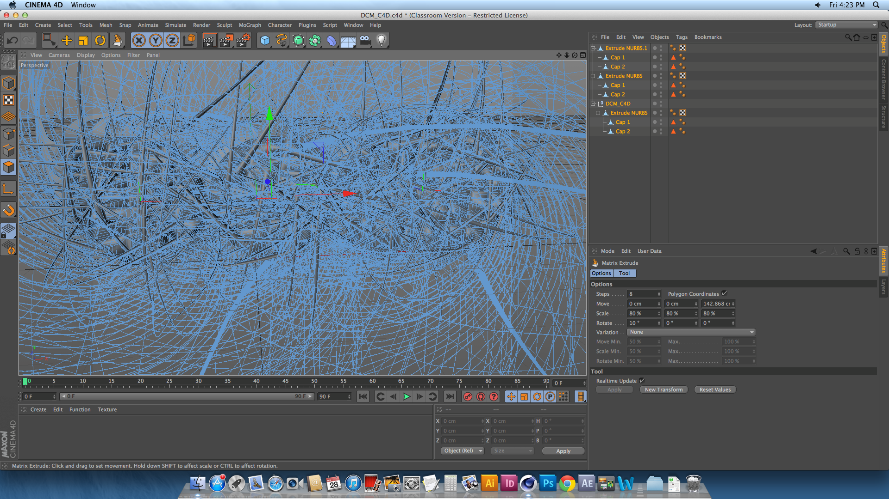
I then made sure the image was editable, and used the knife tool to create cuts across the body of the logo. These cuts would split the shape up fully into separate pieces, whilst keeping the actual shape together, so that it can be altered in many different ways depending on what the user wants. After this made sure that the editable tag was clicked off, and selected the whole piece. I did this by selecting all of the layers on the list to the right of the screen, not on the physical shape itself, to make sure that I was able to select all of the individual pieces of the logo. After I had done this, I then went on to change the shape of the logo drastically, and to do this I went to MESH>CREATE TOOLS> MATRIX EXTRUDE.
This process is usually used to create weird and wonderful shapes like the hair on someone’s head of a 3D model, as well as limbs and pretty much an

y counterpart someone can think of. In this case, I used
the Matrix Extrude to dynamically change the over-all image of this logo, and that is simply done by pulling the tool out and away from the shape. Once the tool is pulled away, every single part of the logo that had been cut up was the extruded and morphed into a heaping mass of spikes and shards, which looked amazing even when it hasn’t been rendered. However, once I did render the image, I was shocked as to how well it all came out. I was able to zoom out of the logo to make more sense of the state of
it.


This is what the final rendered image looks
like. Over all I’m really surprised at how easy it is to make something so simple look so effective. I love the way that each and every individual spike can be seen, and the mass of spiked curves make the image look very mechanic. Because of this, I decided that although  I could make the image look so abstract and messed up by putting in any number of colours, textures and effectors in, I decided to keep the image grey, as I really was taken to the mechanic element that I got from it.